Make these 4 LinkedIn profile updates now to get more job offers

By Abhijit Tamhane

Just one of these strategies used on a LinkedIn profile made them discovered up to 27 times more in searches by recruiters. 


If you’re on the hunt for a new job, there are few tools more powerful than your LinkedIn profile. It’s a one-stop shop for recruiters and hiring managers to learn more about your professional story, so make sure your profile represents not only your experience and strengths but also your goals and what you want to accomplish.

Here are a few new ways to update your LinkedIn profile to give you an edge as a job seeker.

1) Signal to your community that you’re looking

With the Open To Work feature on your LinkedIn profile, you can quietly signal to recruiters that you’re open to new opportunities, and you can now engage your entire professional community in your search. To let the broader LinkedIn community know you are looking, just add an #OpenToWork photo frame on your profile photo. By doing so, when your profile comes up in a search or shows up in the feed because you comment on or “like” a post, professionals beyond your LinkedIn connections will see your #OpenToWork photo frame and can connect you to job openings they’re aware of or facilitate an introduction to a hiring manager. We know that candidates on LinkedIn are nearly four times more likely to land a job at a company where they have connections, so imagine the possibilities of reaching LinkedIn’s community of 700+ million professionals.

2) Spotlight your skills

Recruiters view skills as critical when looking at job candidates. In fact, we’ve found that members with five or more skills listed on their LinkedIn profile are discovered up to 27 times more in searches by recruiters. That’s why it’s important to list your skills—both hard and soft—on your profile.  If you want to turn it up a notch, you can now validate your hard skills with 95 Skill Assessments that you can test against. Once you complete an assessment, a badge gets added to your profile which highlights your proficiency.
And if you don’t have all of the required skills for the job you want, online learning is a great way to build them and increase your chances of getting hired.

See all 4 updates and the complete Fast Company article


Here Is A LinkedIn Secret Weapon To Land A Job

Robin Ryan

Kathleen contacted me because this baby boomer needed career assistance. Her husband had gotten an executive position in a new state, and they were moving halfway across the country for his opportunity. That meant that she was going to be leaving her program manager position behind as the job had was only part-time after the COVID-19 pandemic happened.

She found a Program Manager job that she was exceptionally well-qualified for at a Fortune 500 tech company. She said she wanted to apply, but marketing herself was not her strong suit. Kathleen stated she needed a professional resume writer and LinkedIn Creator to be able to demonstrate that she had the skills to do the job. We discussed the challenges and culture of trying to switch industries as she was coming from a nonprofit organization wanting to move to a tech company. One of the things I mentioned to her was it would be beneficial if Kathleen looked through her LinkedIn connections to see if she knew anybody at the targeted organization. To my surprise, she said, “Oh yes, I do know someone there. The two of us met at a conference I attended, and he was sitting next to me in one of the sessions.” My next question was, “Will he remember you?” And she said,” I don’t know, but I’ll reach out and see if he does.” 

So she sent him a message and didn’t hear back. She had his phone number and then called him. After some prompting about where they met, he vaguely recalled who she was. Kathleen did ask if he was willing to pass on her resume to his employer. He said,  “Sure, send it along.” That led to the resume going to the appropriate people internally. A few days later, she got a call from the internal recruiter talking to her about the job. She described this as her dream job. It took four interviews, but she did indeed land the coveted position. 

As the job market heats up and gets more crowded due to all the layoffs from the pandemic, internal employee referrals are going to make even more of a difference than before. Some companies also pay their employees a fee if they refer someone who is hired and remains at least a few months. 

Michael worked in the finance office for a small manufacturer that had 600 employees and his company was looking for a new sales rep. Lief found the opening and then checked his LinkedIn connections to determine if anyone he knew worked their. He had Michael as a connection. He reached out and ask Michael if he’d send his resume on to the company’s recruiter. It worked. Leif got an interview. After two interviews and passing the company’s personality test, Leif started working there two days ago. 

Referrals are powerful. And today, getting a referral is a secret weapon to get through the crowd and be seen by recruiters, HR, and hiring managers. Anytime an internal employee refers someone, that person receives a solid review. Jobvite, a talent acquisition system reported that employee referrals only make up about 7% of potential candidates, but the number of those referred candidates hired is 44%. That makes this well worth the effort to try and locate a connection to someone inside the company. LinkedIn is the ideal place to search for connections and get a referral. 

Here are some Dos and Don’ts to follow when you utilize this strategy.

Read the Dos and Don'ts and the complete Forbes article


90 Trending LinkedIn Hashtags to Expand your network and engagement


When it comes to using social media for professional purposes, no other platform can match the level of LinkedIn, itself. LinkedIn is the best professional platform, allows us to connect and socialize with likeminded people having the same career aspects. As social media for professionals, LinkedIn is a reliable platform amongst online marketers, business owners, HR departments, and content creators, to develop their networks.

Linkedin hashtags are a very powerful tool to use, especially when you are actively using it for building your brand. Similarly, on most other social media hashtags, LinkedIn hashtags are also a way to reach a larger audience with targeted interest. For that understanding which hashtags to use in your content, becomes crucial to growing your network.

So in this post, we are sharing you some of the best trending LinkedIn hashtags, you better to use in your next posts. Such hashtags are widely used by professionals, and support your post to reach its maximum post expectations. Ultimately, that helps you to present your message in front of the right audience. But, the first question is,


Do Hashtags Work on Linkedin?

The short answer is, absolutely. Yes.  As a social media community and not just a job searching platform, Linkedin is the top leading online communities for professional peoples. And yes, hashtags at LinkedIn are also a powerful way to promote your post and reach it to the maximum exposure.

Like other social media like Twitter, Instagram, LinkedIn hashtags are also widely used to push the content to a wider audience. When being used wisely, mean relevant topical hashtags can boost the post impressions and so the engagements in return.

These are also a better way to reach the target audience and present them with your unique ideas through the posts. You can use hashtags on Linkedin at every type of content from text to visual format contents.

So, if you are at Linkedin to promote your brand and drive more brand mentions, then you better to use relevant hashtags that fit your industry area. For that, search with some relevant hashtags that you can add in your regular posts.

Not limited to marketing perspective only, but as you know that Linkedin is a better place to find your next job and project as well, you can share the post about vacancies at your company there too. And, yes with using the right hashtag in a job updating post you can reach the right candidate seeking the same job profile.

If you are looking for some trending LinkedIn hashtags to grow your network and promoting your services right way, then here is the list for you.


Trending LinkedIn Hashtags 2020


  1. #Networking
  2. #Workfromhome
  3. #Homeoffice
  4. #workingathome
  5. #Life
  6. #Entrepreneurship
  7. #Work
  8. #Success
  9. #Creativity
  10. #Inspiration
See more Trending Hashtags plus Hashtags on:

Popular LinkedIn Hashtags for Management

LinkedIn Hashtags for Digital Marketing

Best LinkedIn Hashtags for Business

LinkedIn Hashtags for Hiring

Top LinkedIn Hashtags for Lawyers

Best LinkedIn Hashtags for Self-help Posts

LinkedIn Hashtags for Job Seekers

AND

Why Using LinkedIn Hashtags is Important?

Quick Tips to Use LinkedIn Hashtags


4 Ways to Increase Your Profile's Ranking on LinkedIn - What can job seekers do to attract a recruiter’s attention on LinkedIn

By Nancy Collamer

It’s critical to increase your profile’s ranking on LinkedIn so you’re more visible to recruiters. There are four ways to do that.

Two: Expand your network. Having a large network boosts your LinkedIn search ranking. So, be sure to reach out to people like former colleagues, classmates and neighbors on a regular basis. The more people you have in your network, the greater the likelihood that a recruiter will find you through your connections.

This is especially useful for connecting with recruiters at smaller companies, who typically don’t pay for the premium LinkedIn Recruiter tools. Since they don’t have access to expanded search capabilities, they depend on first and second-degree connections to source candidates.

Four: Be active on the site. Maintaining an updated LinkedIn profile shows recruiters that you’re professionally engaged. Share relevant content, comment on other people’s articles and link to articles you’ve written.

See all 4 ways and the complete Forbes article with more tips and info


15+ Proven Tips To Build An Amazing LinkedIn Profile

Austin Belcak

Tip #2: Let recruiters know you’re open for business

One of the most frustrating aspects of being a job seeker is pouring hours into your resume, cover letter, or LinkedIn profile only to get zero responses.

What’s the point of putting in all this work if no one’s going to see it?

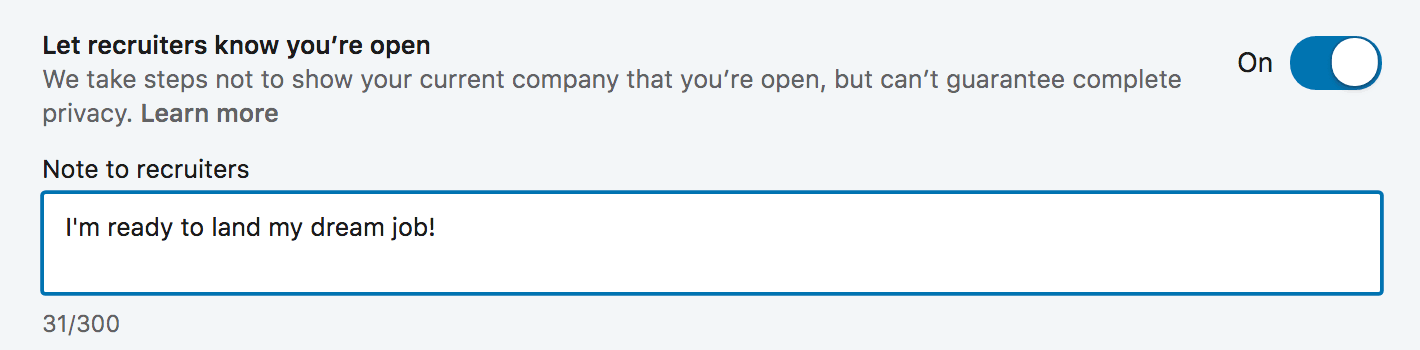
A few years ago, LinkedIn aimed to fix that by rolling out their Open Candidates feature. Open Candidates lets you tell recruiters you’re open to new opportunities and it lets you set preferences for the types of roles you want to hear about.

Here are a few of the levers you can pull:

Leave Recruiters A Note: When you turn on Open Candidates, LinkedIn lets you leave recruiters a note (up to 500 characters) so you can provide some context around your situation and what you’re looking for next.

Your Status: Are you actively searching, passively looking, or not looking but open to the right offer? LinkedIn lets you choose any of the above so recruiters  have a sense of where you’re at in your job search.

Target Roles: LinkedIn also lets you add the job titles you’re interested in/considering so recruiters can send you more relevant opportunities.

Location Preferences: Ready to make a move? Don’t want to move more than 10 feet from your kitchen table? Open Candidates also lets you tell employers where you want your next role to be. You can choose specific cities and you can also let them know you’re interested in remote roles.

Job Types: Finally, Open Candidates lets you tell recruiters what types of roles you’re open to. You can choose from Full Time, Part Time, Contract, Internship, Volunteer, or Temporary.

Once you have all of your preferences setup, the last thing you need to do is make sure you’ve flipped your Open Candidates switch to “On”:
Screenshow showing how to allow recrutiers to find your LinkedIn profile
Awesome! Now that we’ve got the easy stuff out of the way, this is where the fun begins.

Just because you let recruiters know you’re looking for opportunities, doesn’t mean you can put your LinkedIn profile on cruise control and watch the offers roll in. You’re still competing with 500 million other users for that job offer so you need to do everything possible to stand out.

The good news is you’re in the right place. The rest of this post is going to walk you through some LinkedIn profile tips that will set you head and shoulders above the competition and help you land more interviews, connect with amazing people, and rapidly accelerate your career.

LinkedIn Profile Tips: Optimizing From Top To Bottom

Now that we’ve got the basics out of the way, I’m going to show you how to completely optimize your LinkedIn profile to help you rapidly accelerate the results you’re looking for.
When I was completely overhauling my profile, I found that it was easiest to start at the top and work my way down. I’m formatting this post to follow that same flow.

We’ll begin with the very top of your LinkedIn profile page – the URL – and then we’ll work down through your cover photo, profile picture, headline, summary, work experience, skills, recommendations, etc. until we’re covered every single aspect of your profile.

Tip #6: Optimize your LinkedIn headline to get more profile views

“On the average, five times as many people read the headline as read the body copy. When you have written your headline, you have spent eighty cents out of your dollar.” – David Ogilvy, The “Father” of Advertising

That advice is just as relevant to your LinkedIn profile as it is to writing ad copy.

In today’s job market, 90%+ of recruiters are regularly using LinkedIn to find qualified candidates.

When a recruiter is looking to fill a roll, they use LinkedIn’s search functionality to find awesome people like you. But what makes your LinkedIn profile show up at the top vs. the millions of other people in a similar field? Think of it like this:
Let’s say it’s 5pm on Saturday and you don’t feel like cooking. You might head to Google and punch in “best Thai restaurants [your city].”

Google serves a list of restaurants and you begin scanning through their offerings — their menu, reviews from other people, hours, distance, etc. Then you pick one based on what you liked best.

LinkedIn search works the same way!

Instead of searching for Thai food, recruiters are searching for keywords that match the position they’re hiring for.
For example, if they need a new Project Manager, they may search for: Project Manager, PMP, ACP, etc.
If they need a front end developer, they may search for: Front End Developer, Web Designer, Web Developer, etc.

When they hit “search,” LinkedIn scans profiles for relevant data and serves up the people who have the search criteria in their profile. The more your profile matches the search criteria, the higher you’ll show up.

Your LinkedIn headline carries a lot of weight in these searches so you need to make sure it’s fully optimized for the search terms that recruiters are using.

How to identify the keywords you need to use in your LinkedIn headline

Here’s a quick strategy you can use to boost your chances to matching with the terms recruiters are using to find candidates for roles you’re interested in:
  1. 1Open a new Word/Google doc
  2. 2Use LinkedIn jobs to search for roles that match your exact criteria (industry, level of experience, location, etc.)
  3. 3For each role that lines up with your interests, copy the job title and paste it into your doc
  4. 4Rise and repeat until you have copied at least 30 job titles into your doc
  5. 5Now head to WordClouds.com and click on Word List, then Paste/Type text
  6. 6Paste in your 30+ job titles and hit Apply
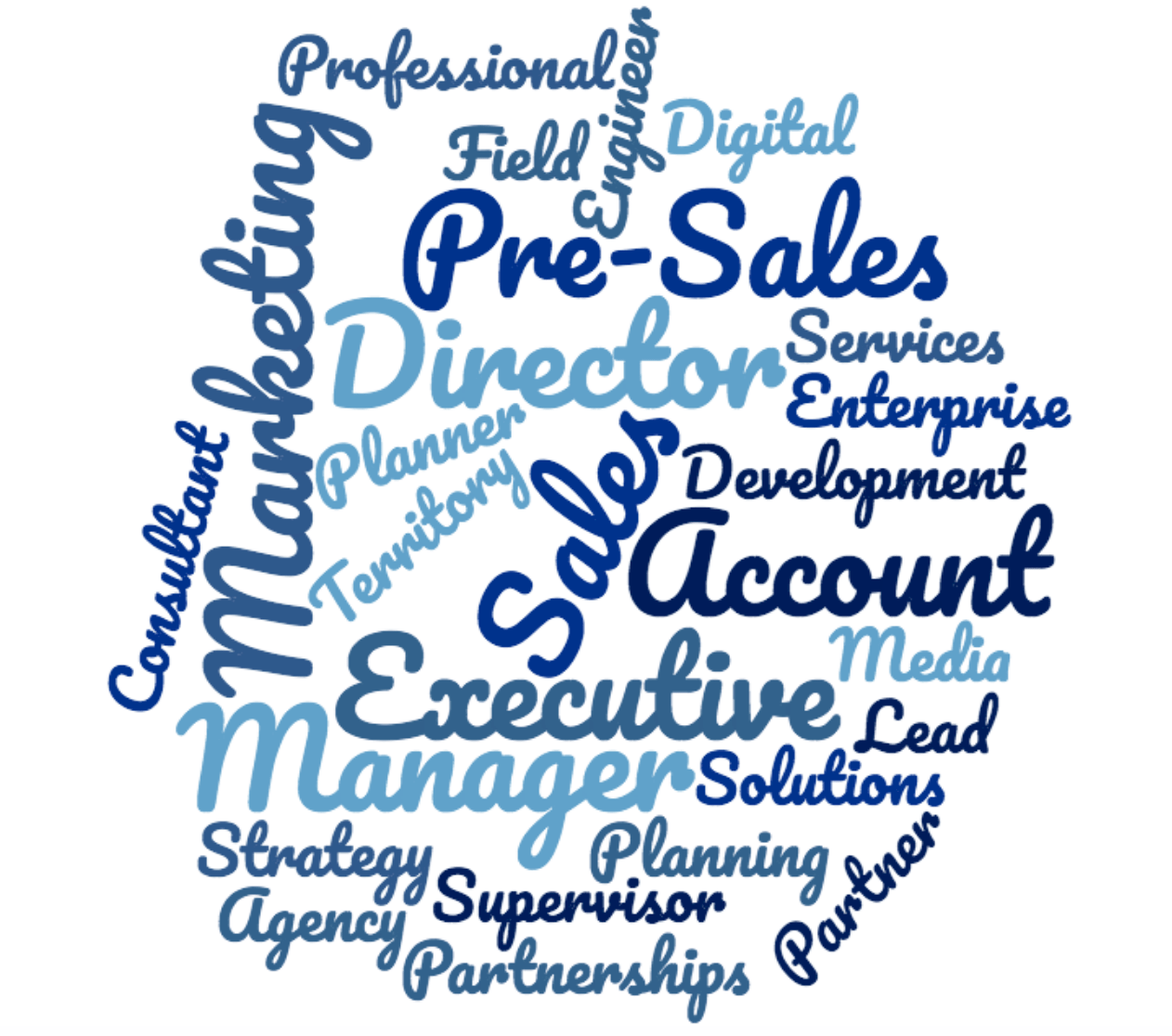
Wordclouds is going to generate a cloud showing which words appear most often across those titles. If you want a more empirical view, you can click on Word List again to see the exact frequency for each word.

The top 3-5 words are the keywords you want to focus on including in your LinkedIn headline.

Here’s an example I created from 30 job titles I found searching for “Sales” in “New York”:
Example of using wordclouds from LinkedIn headline
If you check out the word list, here are the top 5 by frequency:
16 Sales 5 Executive 4 Director 3 Account 3 Manager
Now I can go back to the job titles to get context around word order and come up with a headline that includes as many of those keywords as I can fit. In this case, I may go with: Sales Director / Account Executive.

This is just the starting point though. LinkedIn gives you a lot of space to work with in your headline and you want to use as much of it as you can.

LinkedIn Headline Character Limits

LinkedIn limits you to 120 characters for your professional headline on desktop. If you switch to the LinkedIn mobile app, the character limit increases to 200!
Once you know what keywords you want to inject, you should use the rest of your headline to sell yourself. This will vary based on your goals, but here are a few ideas:
  • Share a quick results-based case study (share accomplishments, metrics, big wins, awards, etc.)
  • Share a link to your personal website or online portfolio right there in your headline (e.g. “learn more about how I do it here > CultivatedCulture.com)
  • Include high priority skills and proficiencies
  • Inject some personality and talk about something you enjoy doing outside of your specific job description
  • Include a call to action for people read more (my profile has this). I use my headline to hook people in and tell them to learn more below with a little emoji pointing down
You should aim to include your high priority keywords at the beginning of your headline, then use the rest of the characters to grab the reader’s attention.

LinkedIn Headline Examples (From Real People)

Here are a few awesome examples of LinkedIn headlines to help you get some inspiration:
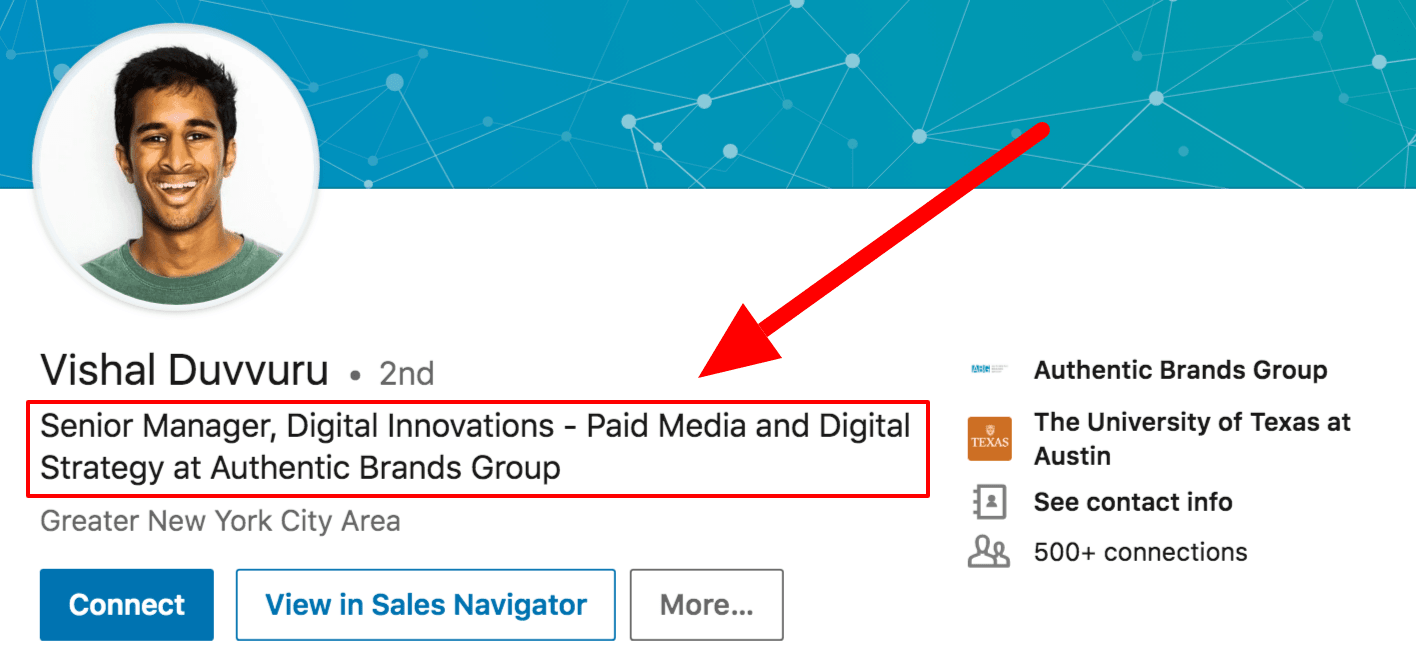
Example of great linkedin headline
Vishal’s keyword-packed headline is going to get him noticed across a broad range of searches. He leads with his title (Senior Manager) and leverages the rest of his character limit to include relevant keywords like Digital Innovation, Paid Media, and Digital Strategy.
Vishal’s LinkedIn Headline: Senior Manager, Digital Innovations – Paid Media and Digital Strategy at Authentic Brands Group

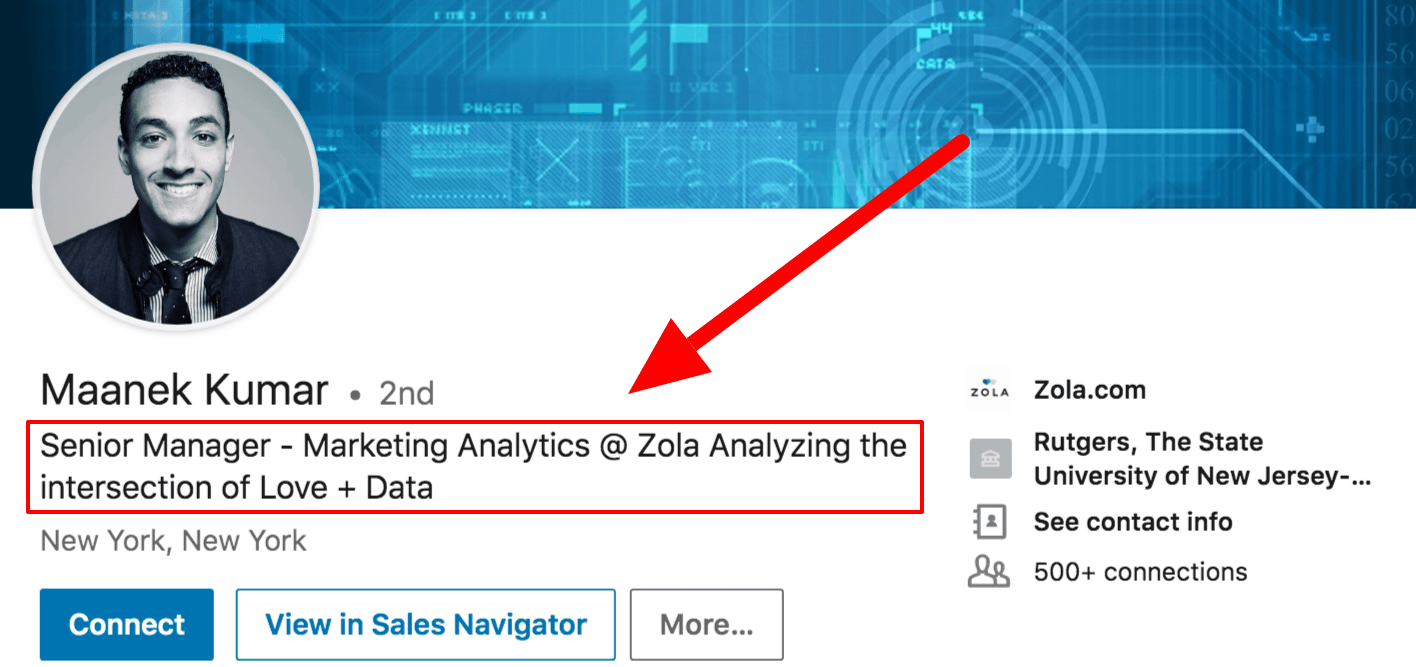
Screenshot of great LinkedIn headline example
Maanek’s headline does a great job of leading with keywords. He’s got a searchable job title in “Senior Manager” and a highly popular field in “Marketing Analytics.” He uses the rest of his characters to add a little more color to his job and what he’s passionate about.
Maanek’s LinkedIn Headline: Senior Manager – Marketing Analytics @ Zola Analyzing the intersection of Love + Data.

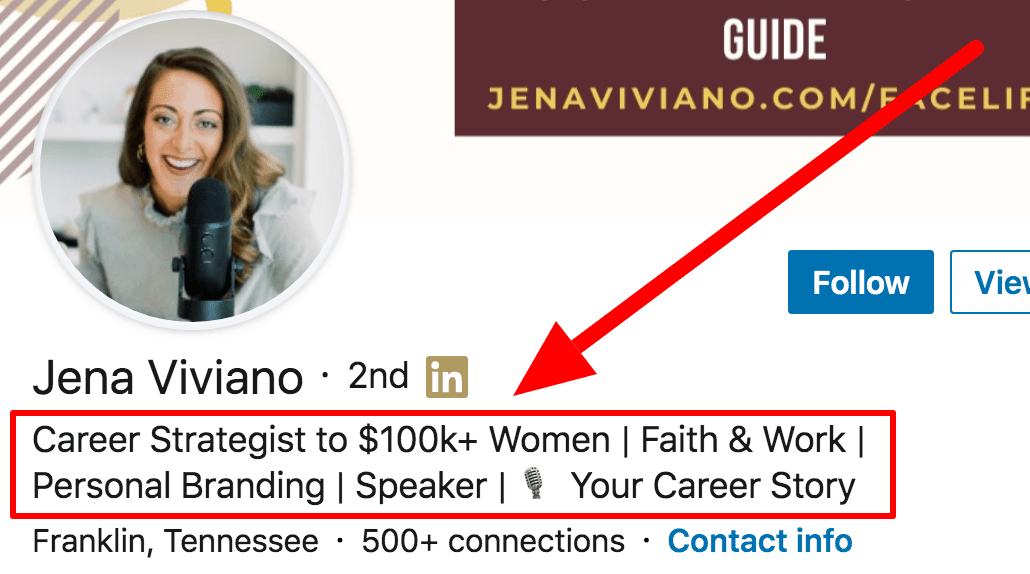
LinkedIn Headline For Entrepreneurs Example #3
While she’s not a job seeker, Jena has a fantastic headline. She uses it to speak to her audience and tell them exactly what she can deliver.

She’s focused on women and she knows how to help them get six figure jobs (kudos to her for using the $100,000 figure instead of writing it out – it’s eye catching!). If you’re an entrepreneur or thought leader, you need to know your audience and your headline should speak directly to them. Address a pain point, share results, make it about them.
Jena’s LinkedIn Headline: Career Coach to $100k+ Women | Professional Development | Personal Branding | Faith & Work | 🎙️ #YourCareerStory

As a closing thought, I always notice that entrepreneurs and CEOs tend to have the best LinkedIn headlines. Why? Because they always need to be selling themselves (and the best ones can do it concisely).

But here’s the thing – you’re a CEO whether you know it or not. The CEO of your own career and your own life. You’re more than just an “Account Manager at Company” or “Human Resources at Company.”

You’ve contributed a lot to your company, your customers, your colleagues, your friends, your family, and your industry. Let that shine through in your LinkedIn headline!

Tip #7: Identify the keywords recruiters are using to find candidates

Remember my little restaurant analogy from the last tip?
Headlines definitely carry a lot of weight when it comes to being found in search results, but LinkedIn isn’t stopping there. They scan every section of your profile and the more matches you have, the more frequently you’ll show up and get called.

LinkedIn is tricky because we can’t create multiple profiles for multiple roles like you can with a resume. You only get one profile and you want it to generate as many opportunities as possible. In order to do that, we need to get a sense of the keyword sets associated with the roles we want.

How to identify the right keywords for your LinkedIn profile

Identifying keywords for your entire profile is a little bit more complex than doing it for your headline.
If you’re tight on budget and/or don’t mind doing a little bit of leg work yourself, you can definitely use the same Wordclouds trick I mentioned above.

That said, there are some paid tools out there that will help be significantly more efficient here. My two favorites are Jobscan and Skillsyncer (I have no affiliation with either and it’s worth noting that they are both paid tools with some free trial options).

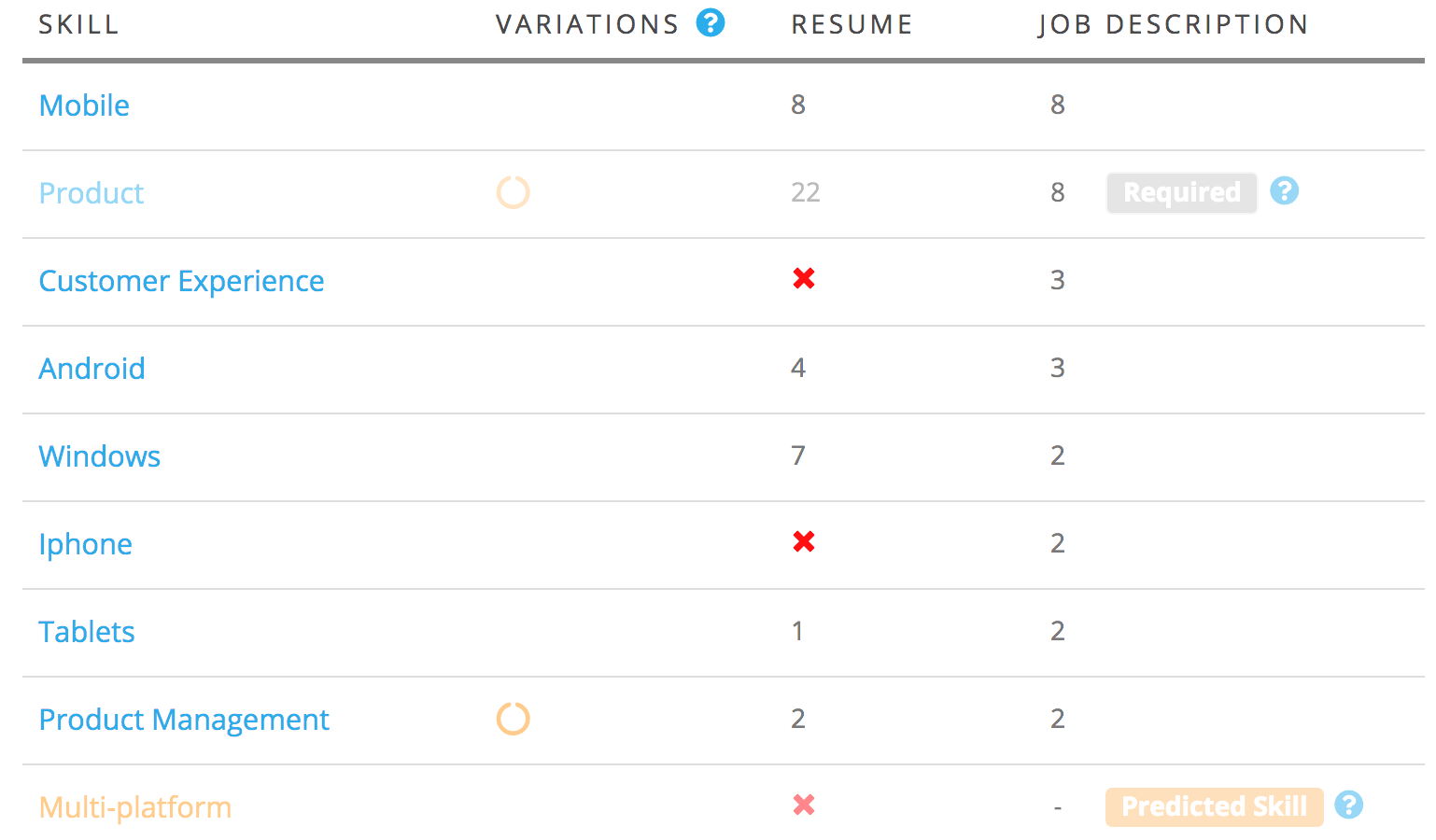
Both of these platforms will digest any job description you upload and give you a detailed breakdown of what keywords you need to target. You can also copy and paste your LinkedIn profile sections to see how well you match up:
JobScan skill match report
If you scan a few job descriptions for every type of role you’re targeting, these platforms will give you an idea of what keywords you need to prioritize.

Your job is to make sure they’re naturally woven into each of the LinkedIn profile sections we talk about in the rest of this post.

See all 15 tips and the complete article

5 Steps To Connect With People Outside Your Network On LinkedIn

by Neal Schaffer

Once you move beyond the generic “add connections” option that LinkedIn has, you might want to specifically search for and increase your connections with people aligned with whatever connection policy you might have.  The challenge is that restrictions exist within LinkedIn that may prevent you from inviting others you don’t personally know.  You are entitled to try to connect with people without knowing their email address, but once five people respond to your invitation to connect by nothing that they don’t know you, your ability to connect will be restricted. So how to network on LinkedIn?

This is especially important because it is very difficult to message 2nd and 3rd degree connections.

Once you’ve decided to connect with professionals that aren’t part of your network, chances are you will initially find them by doing advanced people searches.  If you are already an experienced user, you’ll likely encounter people you might want to connect with everywhere on LinkedIn.  These people often appear on the “people you may know” widget that is featured prominently in the top right-hand corner of your LinkedIn home page and in group discussions.  So, once you find someone with whom you’d like to connect, follow these guidelines to complete the connection:

1) “Read” the profile:  A LinkedIn profile says a thousand things about someone’s attitude toward online professional networking, and by thoroughly reading the profile, you can determine how active a particular user is on the website.  In general, the more active people are on LinkedIn, the more they will understand the value of business networking and thus the more willing they will be to connect if you send a personalized invite. This is especially the case if they are a LinkedIn LION or Open Networker.

2) Warm leads are always the best:  As in real life, how to network on LinkedIn is all about introductions through a “warm” lead, someone your target connection actually knows who can make a personal introduction on your behalf, often leads to the greatest success.  Rather than relying on a cold call or email, get in touch with the person who connects the two of you and ask him or her for a formal introduction.  If your targeted user is a third-degree connection, find someone who could facilitate an introduction between you and a person who is actually connected to your targeted user.  Your eventual goal is to be introduced to your second-degree connection who can then facilitate the introduction with your third-degree connection.

Read all 5 steps and the complete Neal Schaffer article

39 Experts Discuss Their Favorite LinkedIn Strategy


LinkedIn is the largest business social networking site in the world. With so many different business professionals from a wide array of backgrounds we thought it would be best to call in some help to ensure you use the right LinkedIn strategy for your business.

Below is the advice from 39 experts who have spent a lot of time coming up with strategies they condensed into short snippets to help you grow your business through LinkedIn. These thoughts are grouped into relevant categories to make it easier for you to take action on specific areas of your LinkedIn marketing.

A. LinkedIn Profile

1) Jyoti Chaudhary  PMbyPM

I think a good profile picture and an eye-catching tagline is extremely important for reaching out and making new connections. Regular communication and nurturing are required to convert the business prospects into customers.

2) Nevena Sofranic  Omnes Group

People will decide in the first few seconds if they want to add you to their network. To grab their attention you need *a good picture*. A picture of you smiling will do the trick, but a picture of you speaking in front of prospects will make you look like an expert. People mentally digest pictures before they read.


B.  Find New Connections

How consistent are you with reaching out to new connections? These new connections can be anything from prospects to networking partners. You can find them through LinkedIn Groups and LinkedIn Search which we discuss in more detail later.

5) Marietta Gentles Crawford  Marie Brands for You

Ditch automating connection requests and using sales templates. Lately, since LinkedIn has had a resurgence, people are relying on hacks to get in touch with their target audience and sell their stuff.

Automation does not work! I can smell an automated invitation or script that comes immediately after I accept a request, and I will ignore or delete it immediately. It’s not an effective LinkedIn strategy, so ditch it and focus on adding value to your network. You can’t automate genuine relationship building.

6) Jeff Romero  Octiv Digital

One thing I have recently discovered a new LinkedIn strategy that works with exporting a list of my followers and segmenting them by the hashtags they follow.

Using this method when I launched a new agency last quarter, I was able to segment the data by those following hashtags like #digitalmarketing or #onlinemarketing and it gave me a quick list of people to reach out to.

I’ve had a great response rate (we’re already connected, so I’m sure that helps) and I already know these professionals are interested in the services my agency offers.


C. LinkedIn content

If you don’t produce content, you will struggle to stay competitive on LinkedIn. That is because LinkedIn is much more of a content repository now than it was even a few short years ago. Below we discuss what LinkedIn strategy for various content approaches.

15) KellyAnn Romanych Veterans Legal Institute

One LinkedIn strategy that works for me is to focus on supporting our donors. Many are humble and prefer not to self-promote.

I like, comment, and share their content to celebrate their compassion and generosity. It is heartfelt and genuine. Our donors know the value of creating great content and are grateful to have help in getting it out to those who can benefit.

16) Neill Marshall Health Search Partners

I have a Google alert on my top 160 potential clients. When they are mentioned in the media, I get a google alert that morning at 8:00 AM. If the article is positive, I share it on LinkedIn with a comment and tag them. They get bragged about without having to do the bragging and I build goodwill.

Read all 39 strategies and the complete article

How to Leverage LinkedIn in 20 Minutes a Day


You may be working from home but for many professionals that doesn’t equate to hours of spare time. Conversely, as we start to emerge from the COVID-19 fog, you know that you need to start generating new business and promoting yourself.

LinkedIn is a great resource to leverage in order to market and position your brand when you are still remote working. Many people think they don’t have time for LinkedIn even when they understand it is an important social media tool. However, 20 minutes a day is actually sufficient time to build and engage your audience to build your brand and generate material business.

Here are the things that you should check each day to achieve great results. Even if you do only one of these consistently, you will rapidly see the fruits of your labour.

1) Home Page: As soon as you land on LinkedIn, the Home Page is the first thing that you see. As you scroll down the page, you will notice the activities related to your network. There are several tasks for you here: You may like to interact with friends and colleagues who are adding value. You may comment or share the activities you find helpful. Algorithm-wise, comments are worth more than shares on LinkedIn – people will appreciate them as they’ll drive the reach of their posts.

2) Who Viewed My Profile?: On the Home page just below your picture, you will notice “Who viewed your profile”, followed by the number of views. Check out who is viewing your profile.

You want to be found. That’s what LinkedIn is all about. If you are getting found at rather frequent intervals and are attaining substantial three-figure numbers, you are well on your way to this goal.

Review the person who stopped by as they are interested in you. If they fit your “ideal client” criteria reach out and invite them to join your network. If you say you noticed they veiwd your profile, they’re 10x more likely to accept your invitation.

4) Invitations: Invite 10 targeted people to your network daily: Tell them how you know them, find something in common, be enthusiastic, reference their profile. Courtesy will get you far. I always thank the person in advance for agreeing to connect. When they connect, offer to introduce them to someone in your network if they wish. That way, your new contact feels they can benefit from the connection.

See all 7 ways to leverage and the complete Entrepreneur article

10 Tips to A More Professional LinkedIn Profile


Regardless of whether you are in business, trying to put your startup on the map, new to the working world or focus mostly on non-profit work, LinkedIn is a very good networking tool to help you achieve your professional goals.
A hunting ground for headhunters, HR managers and new businesses looking for partners or opportunities, it will do you good to have a professional LinkedIn profile set up, to let you take advantage of this.
Unlike on Facebook, where profiles could be made up and are more suitable for personal networking rather than a professional one, LinkedIn encourages users to provide a highly professional look to their resume and/or profile on the networking site. Here are 10 things you can do to enhance your LinkedIn profile for a more professional look.

2. Temporarily Turn Off Activity Broadcast

If you’ve had LinkedIn for a while and have already connected with people, updating your profile will fill their feed and your ‘Wall’ with update notices. This means that if you happen to choose to update your LinkedIn with ‘old details’, for instance, if you are finally coming out as the HR manager that you are, your connections will think that you’ve only gotten the job recently.
By turning off your activity broadcast temporarily, you can silently update your LinkedIn profile without letting the world know.
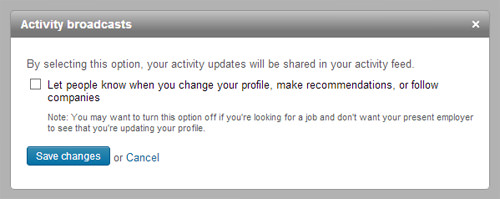
Activity Broadcasts
To do this, go to ‘Settings’, and under ‘Privacy Controls’, you should be able to see ‘Turn on/off your activity broadcasts’.
Click on that and another overlay window will appear allowing you to uncheck the option.
After saving these changes, other users won’t be able to see every detailed profile update you’ve made. You can choose to leave it off or turn it on after you’re done editing.

7. Use LinkedIn Badges On Your Website

LinkedIn has a few different designs of profile badges that can help you promote your LinkedIn profile to the world.
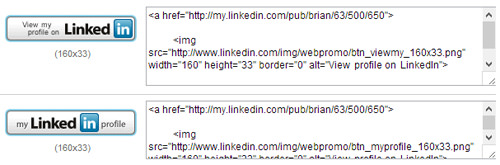
To find these badges, go to ‘Settings’ and then click on the link to ‘Edit your public profile’. To the right, you will see ‘Profile Badges’. Clicking on Create a profile badge will bring you to another page where you can choose from the many designs available.
LinkedIn Badges
You can use the HTML codes of these badges to use on your blog, website or other forums that you frequently use. When users click on these badges, they’ll be automatically directed to your LinkedIn profile.

9. Personalize LinkedIn Email Requests

When trying to make a connection with a fellow professional, you have to send them an email request. The request is already standardized but it’s always a good idea to personalize the notes. The receiver would at least get an idea of who you are and if you are up to it, you can even cut to the chase and suggest a business meeting with the person.