by Neal Schaffer
Once you move beyond the generic “add connections” option that
LinkedIn has, you might want to specifically search for and increase
your connections with people aligned with whatever connection policy you
might have. The challenge is that restrictions exist within LinkedIn
that may prevent you from inviting others you don’t personally know.
You are entitled to try to connect with people without knowing their
email address, but once five people respond to your invitation to
connect by nothing that they don’t know you, your ability to connect
will be restricted. So how to network on LinkedIn?
This is especially important because it is very difficult to message 2nd and 3rd degree connections.
Once you’ve decided to connect with professionals that aren’t part of
your network, chances are you will initially find them by doing
advanced people searches. If you are already an experienced user,
you’ll likely encounter people you might want to connect with everywhere
on LinkedIn. These people often appear on the “people you may know”
widget that is featured prominently in the top right-hand corner of your
LinkedIn home page and in group discussions. So, once you find someone
with whom you’d like to connect, follow these guidelines to complete
the connection:
1) “Read” the profile: A LinkedIn profile
says a thousand things about someone’s attitude toward online
professional networking, and by thoroughly reading the profile, you can
determine how active a particular user is on the website. In general,
the more active people are on LinkedIn, the more they will understand
the value of business networking and thus the more willing they will be
to connect if you send a personalized invite. This is especially the
case if they are a LinkedIn LION or Open Networker.
2) Warm leads are always the best: As in real life,
how to network on LinkedIn is all about introductions through a “warm”
lead, someone your target connection actually knows who can make a
personal introduction on your behalf, often leads to the greatest
success. Rather than relying on a cold call or email, get in touch with
the person who connects the two of you and ask him or her for a formal
introduction. If your targeted user is a third-degree connection, find
someone who could facilitate an introduction between you and a person
who is actually connected to your targeted user. Your eventual goal is
to be introduced to your second-degree connection who can then
facilitate the introduction with your third-degree connection.
Read all 5 steps and the complete Neal Schaffer article
39 Experts Discuss Their Favorite LinkedIn Strategy
by
LinkedIn is the largest business social networking site in the world. With so many different business professionals from a wide array of backgrounds we thought it would be best to call in some help to ensure you use the right LinkedIn strategy for your business.
Below is the advice from 39 experts who have spent a lot of time coming up with strategies they condensed into short snippets to help you grow your business through LinkedIn. These thoughts are grouped into relevant categories to make it easier for you to take action on specific areas of your LinkedIn marketing.
A. LinkedIn Profile
1) Jyoti Chaudhary PMbyPM
I think a good profile picture and an eye-catching tagline is extremely important for reaching out and making new connections. Regular communication and nurturing are required to convert the business prospects into customers.
2) Nevena Sofranic Omnes Group
People will decide in the first few seconds if they want to add you to their network. To grab their attention you need *a good picture*. A picture of you smiling will do the trick, but a picture of you speaking in front of prospects will make you look like an expert. People mentally digest pictures before they read.
B. Find New Connections
How consistent are you with reaching out to new connections? These new connections can be anything from prospects to networking partners. You can find them through LinkedIn Groups and LinkedIn Search which we discuss in more detail later.
5) Marietta Gentles Crawford Marie Brands for You
Ditch automating connection requests and using sales templates. Lately, since LinkedIn has had a resurgence, people are relying on hacks to get in touch with their target audience and sell their stuff.
Automation does not work! I can smell an automated invitation or script that comes immediately after I accept a request, and I will ignore or delete it immediately. It’s not an effective LinkedIn strategy, so ditch it and focus on adding value to your network. You can’t automate genuine relationship building.
6) Jeff Romero Octiv Digital
One thing I have recently discovered a new LinkedIn strategy that works with exporting a list of my followers and segmenting them by the hashtags they follow.
Using this method when I launched a new agency last quarter, I was able to segment the data by those following hashtags like #digitalmarketing or #onlinemarketing and it gave me a quick list of people to reach out to.
I’ve had a great response rate (we’re already connected, so I’m sure that helps) and I already know these professionals are interested in the services my agency offers.
C. LinkedIn content
If you don’t produce content, you will struggle to stay competitive on LinkedIn. That is because LinkedIn is much more of a content repository now than it was even a few short years ago. Below we discuss what LinkedIn strategy for various content approaches.
15) KellyAnn Romanych Veterans Legal Institute
One LinkedIn strategy that works for me is to focus on supporting our donors. Many are humble and prefer not to self-promote.
I like, comment, and share their content to celebrate their compassion and generosity. It is heartfelt and genuine. Our donors know the value of creating great content and are grateful to have help in getting it out to those who can benefit.
16) Neill Marshall Health Search Partners
I have a Google alert on my top 160 potential clients. When they are mentioned in the media, I get a google alert that morning at 8:00 AM. If the article is positive, I share it on LinkedIn with a comment and tag them. They get bragged about without having to do the bragging and I build goodwill.
How to Leverage LinkedIn in 20 Minutes a Day
Melanie Goodman
You may be working from home but for many professionals that doesn’t equate to hours of spare time. Conversely, as we start to emerge from the COVID-19 fog, you know that you need to start generating new business and promoting yourself.
LinkedIn is a great resource to leverage in order to market and position your brand when you are still remote working. Many people think they don’t have time for LinkedIn even when they understand it is an important social media tool. However, 20 minutes a day is actually sufficient time to build and engage your audience to build your brand and generate material business.
Here are the things that you should check each day to achieve great results. Even if you do only one of these consistently, you will rapidly see the fruits of your labour.
1) Home Page: As soon as you land on LinkedIn, the Home Page is the first thing that you see. As you scroll down the page, you will notice the activities related to your network. There are several tasks for you here: You may like to interact with friends and colleagues who are adding value. You may comment or share the activities you find helpful. Algorithm-wise, comments are worth more than shares on LinkedIn – people will appreciate them as they’ll drive the reach of their posts.
2) Who Viewed My Profile?: On the Home page just below your picture, you will notice “Who viewed your profile”, followed by the number of views. Check out who is viewing your profile.
You want to be found. That’s what LinkedIn is all about. If you are getting found at rather frequent intervals and are attaining substantial three-figure numbers, you are well on your way to this goal.
Review the person who stopped by as they are interested in you. If they fit your “ideal client” criteria reach out and invite them to join your network. If you say you noticed they veiwd your profile, they’re 10x more likely to accept your invitation.
4) Invitations: Invite 10 targeted people to your network daily: Tell them how you know them, find something in common, be enthusiastic, reference their profile. Courtesy will get you far. I always thank the person in advance for agreeing to connect. When they connect, offer to introduce them to someone in your network if they wish. That way, your new contact feels they can benefit from the connection.
See all 7 ways to leverage and the complete Entrepreneur article
You may be working from home but for many professionals that doesn’t equate to hours of spare time. Conversely, as we start to emerge from the COVID-19 fog, you know that you need to start generating new business and promoting yourself.
LinkedIn is a great resource to leverage in order to market and position your brand when you are still remote working. Many people think they don’t have time for LinkedIn even when they understand it is an important social media tool. However, 20 minutes a day is actually sufficient time to build and engage your audience to build your brand and generate material business.
Here are the things that you should check each day to achieve great results. Even if you do only one of these consistently, you will rapidly see the fruits of your labour.
1) Home Page: As soon as you land on LinkedIn, the Home Page is the first thing that you see. As you scroll down the page, you will notice the activities related to your network. There are several tasks for you here: You may like to interact with friends and colleagues who are adding value. You may comment or share the activities you find helpful. Algorithm-wise, comments are worth more than shares on LinkedIn – people will appreciate them as they’ll drive the reach of their posts.
2) Who Viewed My Profile?: On the Home page just below your picture, you will notice “Who viewed your profile”, followed by the number of views. Check out who is viewing your profile.
You want to be found. That’s what LinkedIn is all about. If you are getting found at rather frequent intervals and are attaining substantial three-figure numbers, you are well on your way to this goal.
Review the person who stopped by as they are interested in you. If they fit your “ideal client” criteria reach out and invite them to join your network. If you say you noticed they veiwd your profile, they’re 10x more likely to accept your invitation.
4) Invitations: Invite 10 targeted people to your network daily: Tell them how you know them, find something in common, be enthusiastic, reference their profile. Courtesy will get you far. I always thank the person in advance for agreeing to connect. When they connect, offer to introduce them to someone in your network if they wish. That way, your new contact feels they can benefit from the connection.
See all 7 ways to leverage and the complete Entrepreneur article
10 Tips to A More Professional LinkedIn Profile
Regardless of whether you are in business, trying to put your startup on the map, new to the working world or focus mostly on non-profit work, LinkedIn is a very good networking tool to help you achieve your professional goals.
A hunting ground for headhunters, HR managers and new businesses looking for partners or opportunities, it will do you good to have a professional LinkedIn profile set up, to let you take advantage of this.
Unlike on Facebook, where profiles could be made up and are more suitable for personal networking rather than a professional one, LinkedIn encourages users to provide a highly professional look to their resume and/or profile on the networking site. Here are 10 things you can do to enhance your LinkedIn profile for a more professional look.
2. Temporarily Turn Off Activity Broadcast
If you’ve had LinkedIn for a while and have already connected with people, updating your profile will fill their feed and your ‘Wall’ with update notices. This means that if you happen to choose to update your LinkedIn with ‘old details’, for instance, if you are finally coming out as the HR manager that you are, your connections will think that you’ve only gotten the job recently.
By turning off your activity broadcast temporarily, you can silently update your LinkedIn profile without letting the world know.
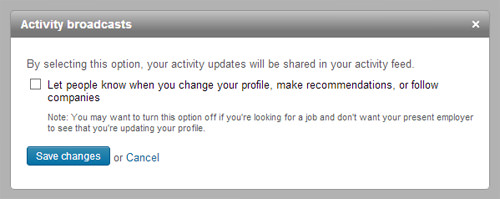
To do this, go to ‘Settings’, and under ‘Privacy Controls’, you should be able to see ‘Turn on/off your activity broadcasts’.
Click on that and another overlay window will appear allowing you to uncheck the option.
After saving these changes, other users won’t be able to see every detailed profile update you’ve made. You can choose to leave it off or turn it on after you’re done editing.
7. Use LinkedIn Badges On Your Website
LinkedIn has a few different designs of profile badges that can help you promote your LinkedIn profile to the world.
To find these badges, go to ‘Settings’ and then click on the link to ‘Edit your public profile’. To the right, you will see ‘Profile Badges’. Clicking on ‘Create a profile badge‘ will bring you to another page where you can choose from the many designs available.
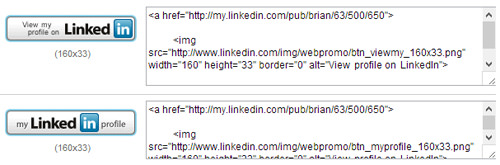
You can use the HTML codes of these badges to use on your blog, website or other forums that you frequently use. When users click on these badges, they’ll be automatically directed to your LinkedIn profile.
9. Personalize LinkedIn Email Requests
When trying to make a connection with a fellow professional, you have to send them an email request. The request is already standardized but it’s always a good idea to personalize the notes. The receiver would at least get an idea of who you are and if you are up to it, you can even cut to the chase and suggest a business meeting with the person.
14 LinkedIn Hacks That Will Triple the Size of Your Network in Two Weeks
LinkedIn is amazing.
When it comes to networking with professionals, there is simply no better place to hang out.
Not Snapchat. Not Facebook. Not Instagram.
LinkedIn is the professional’s jam.
LinkedIn is a great place to attract business users who are serious about their stuff.
Nearly every professional on the planet has a LinkedIn profile.
This large user base makes LinkedIn an ideal platform for marketing B2B products and services.
But here’s the thing. You need to grow your network for these marketing efforts to be effective.
In this article, I’ll discuss LinkedIn hacks that will triple the size of your network, which in turn will lead to more engagement, conversions, and revenue.
This article, in other words, is about you making more money.
Growing your LinkedIn network is how it happens.
1. Include Images in Posts
This might sound like a simple thing, but it’s really important on LinkedIn specifically.It’s no secret that images increase engagement on social media posts. On LinkedIn, research shows that including a photo increases views 11x.

This means you need a header pic, profile pic, and pictures on all posts you publish to maximize your profile’s viewability.
You can’t just post any images, however. They need to be relevant to your target audience, in which case you’ll need to understand who that audience is.
Let’s deal with that point.
2. Cater to Your Audience
Do you know what your LinkedIn audience wants, likes, needs, and will benefit from?
Everyone’s network is different, but you can make a few assumptions based on the data.
For example, comScore broke down the demographic composition of each social media network. Although LinkedIn is one of the most popular social networks among adults aged 30 and older, younger Millennials tend to avoid it.

What this means is you don’t have to worry about being trendy like BuzzFeed on this network. A traditional approach should work just fine on these professionals.
Generate quality leads on LinkedIn by posting unique and sensible content that encourages clicks.
A premium or paid membership on LinkedIn gives you a robust set of data on who’s viewing your profile, reading your posts, and interacting with you. It makes sense to analyze these metrics from time to time.
Whether you look at the data or not, there is one thing you should be doing — getting to know your network.
Interact, message, like, follow, post, and comment around. It will pay off as you get to know your network on a more personal basis.
7. Track Your LinkedIn Analytics
Data analytics are the only way to truly know how any online campaign is doing, and LinkedIn is no different.Though you can’t track LinkedIn views through Google Analytics or SEMrush, you can track them through the site’s internal analytics.

The Next Web already has a great article detailing which LinkedIn analytics are available and how to access them, so I won’t delve too deeply into it here.
What I will tell you is it’s a great idea to export these metrics into your own spreadsheet or database and track them offline in conjunction with other social networking and web traffic.
Read all 14 hacks and the compete article
The 7 Deadly LinkedIn Sins
Stephen Key
LinkedIn is growing by leaps and bounds. No surprise -- it’s a perfect place for people to connect and do business online. Though along with the platform’s growth, there seems like an ever-growing divide between users who see huge returns on their investment and those who swear that LinkedIn just “doesn’t work.”
I get it. It’s easy to access people you want to connect and do business with, but doesn’t mean you’ll be successful, especially if you approach using the platform incorrectly. This may sound harsh, but someone has to say it: It’s not other people. It’s you. Hopefully, the below advice can help. Here are the seven deadly sins that will cause your LinkedIn outreach to go unanswered.
See all 7 Deadly Sins and the complete Entrepreneur article
LinkedIn is growing by leaps and bounds. No surprise -- it’s a perfect place for people to connect and do business online. Though along with the platform’s growth, there seems like an ever-growing divide between users who see huge returns on their investment and those who swear that LinkedIn just “doesn’t work.”
I get it. It’s easy to access people you want to connect and do business with, but doesn’t mean you’ll be successful, especially if you approach using the platform incorrectly. This may sound harsh, but someone has to say it: It’s not other people. It’s you. Hopefully, the below advice can help. Here are the seven deadly sins that will cause your LinkedIn outreach to go unanswered.
5. Being needy.
Have a little confidence. Act like you belong at the table. Don’t immediately reach out to someone after they accept your connection request. Don’t message them a second time after just 24 hours have passed without a response. This is another way of being respectful of other people’s time and space. I promise you, it’s a more effective way of building a foundation for a productive business relationship.6. Getting too personal.
It’s okay to get personal at times, but remember, this is a place for business. You’re trying to connect with people professionally. LinkedIn content, especially video, has had amazing reach over the last few years, but just because you can post something doesn’t mean you should. LinkedIn is a tool for branding. What does your lunch or the fact that you have time to post about it say about your professional brand? There are plenty of other platforms to share your political beliefs, vacation shots and breakfast choices.See all 7 Deadly Sins and the complete Entrepreneur article
6 LinkedIn tips to make your profile pop
By Matt Kapko
Most professionals are aware of the business-oriented social network, LinkedIn, and many of them use it. However, a large percentage of businesspeople struggle with making the most of the world's largest professional social network.
"LinkedIn is probably the most underutilized platform on the face of the planet," according B. Bonin Bough, vice president of Global Media and Consumer Engagement, Mondelez International, a global snack foods conglomerate. Bough spoke last week in Las Vegas at the 2015 International Consumer Electronics Show.
We asked LinkedIn for advice for CIOs, IT executives and other businesspeople who want to stand out on LinkedIn. Here are six tips to help you achieve business value from the platform.

A scattered and poorly developed profile means you may not be showing up in relevant searches. You may also be missing out on volunteer opportunities, speaking engagements and business networking, according to LinkedIn.
You don't have to tackle the entire job at once. LinkedIn encourages you to break up you profile makeover into a set of smaller jobs. "Adding a profile photo, a compelling headline, a summary of 40 words or more, filling out your experience section and adding your skills, are great places to start," the company says.
You can make changes to your profiles using LinkedIn's mobile app or via a new, guided experience that was recently introduced along with a series of new desktop features for profiles.
You can also increase your exposure by adding rich media, a background photo and details about volunteer work, certifications or organizations you support.
Each action you take helps to make you more discoverable to the hundreds of millions of professionals on and off of LinkedIn," according to the company.
Don't worry about pestering other business professionals or hesitate to contact people you haven't spoken with in a while. LinkedIn says its Connected app can help you find appropriate moments to connect. Job changes, a mention in the news, work anniversaries and recent meetings are all opportune times to reach out, according to the company.
LinkedIn's self-publishing platform gives members a platform to share lessons learned or comment on industry trends.
You're not only encouraged to showcase your areas of expertise but to also take the time to craft an authentic voice. While your voice may not develop naturally overnight, it's important to stay true to who you are and how you want to present yourself, according to LinkedIn.
"Publishing posts is a great way to showcase your professional knowledge, position yourself as a thought leader in your industry and even highlight some of the interesting things your company is doing," LinkedIn says.
Read all 6 tips and the complete CIO article
Most professionals are aware of the business-oriented social network, LinkedIn, and many of them use it. However, a large percentage of businesspeople struggle with making the most of the world's largest professional social network.
"LinkedIn is probably the most underutilized platform on the face of the planet," according B. Bonin Bough, vice president of Global Media and Consumer Engagement, Mondelez International, a global snack foods conglomerate. Bough spoke last week in Las Vegas at the 2015 International Consumer Electronics Show.
We asked LinkedIn for advice for CIOs, IT executives and other businesspeople who want to stand out on LinkedIn. Here are six tips to help you achieve business value from the platform.
1) Make Your LinkedIn Profile Shine
It all begins with your profile, the default starting point where LinkedIn gives you the chance to make the right first impression and attract the most meaningful and relevant opportunities.A scattered and poorly developed profile means you may not be showing up in relevant searches. You may also be missing out on volunteer opportunities, speaking engagements and business networking, according to LinkedIn.
You don't have to tackle the entire job at once. LinkedIn encourages you to break up you profile makeover into a set of smaller jobs. "Adding a profile photo, a compelling headline, a summary of 40 words or more, filling out your experience section and adding your skills, are great places to start," the company says.
You can make changes to your profiles using LinkedIn's mobile app or via a new, guided experience that was recently introduced along with a series of new desktop features for profiles.
You can also increase your exposure by adding rich media, a background photo and details about volunteer work, certifications or organizations you support.
Each action you take helps to make you more discoverable to the hundreds of millions of professionals on and off of LinkedIn," according to the company.
2) Don't Be Shy on LinkedIn
A professional social network is no place to be shy. "Networking is crucial for your career, but people tend to transform from social butterflies in their personal worlds to flies on the wall in their professional spheres," according to LinkedIn.Don't worry about pestering other business professionals or hesitate to contact people you haven't spoken with in a while. LinkedIn says its Connected app can help you find appropriate moments to connect. Job changes, a mention in the news, work anniversaries and recent meetings are all opportune times to reach out, according to the company.
6) Find Your Voice on LinkedIn
"Your professional identity isn't just about what you've done," according to LinkedIn. "It's also how you think and what you know."LinkedIn's self-publishing platform gives members a platform to share lessons learned or comment on industry trends.
You're not only encouraged to showcase your areas of expertise but to also take the time to craft an authentic voice. While your voice may not develop naturally overnight, it's important to stay true to who you are and how you want to present yourself, according to LinkedIn.
"Publishing posts is a great way to showcase your professional knowledge, position yourself as a thought leader in your industry and even highlight some of the interesting things your company is doing," LinkedIn says.
Read all 6 tips and the complete CIO article
REVEALED: The simple keywords to use on your LinkedIn profile that will have employers coming to YOU with job offers
If you’re in a job search or plan to be soon, you know that the stakes are high in this competitive market. A major part of the process where many job seekers routinely underprepare is the interview. In fact, I often see candidates spend more time planning their outfit than their content.
While what you wear certainly has an impact, what you share earns an offer. And just when you thought the interview couldn’t get any more stressful, the current pandemic has changed up the game in new ways, so there are a few additional things you need to be ready for if you want to stand out and secure a great next step in your career.
Although you’ll no longer need to worry about the grip of your handshake (perhaps ever again), here are three new aspects that will be important to focus on in your next job interview:
1) You’ll need to set up the environment. While video teleconferencing has become more popular over the last several years, use of this medium for job interviews has dominated in the past few months due to social distancing, which means expectations for a near flawless execution have also skyrocketed. Fumbling through the process while experiencing distractions and technical difficulties isn’t an option, so it’s up to you to master the platforms being used and practice beforehand so you appear confident in troubleshooting any unexpected challenges.
And now, instead of showing up to a building where you meet in a conference room or office, you are required to set the stage for the interview environment, which takes some additional preparation and can have a major impact on the outcome. As the host of at least one side of the interview space, you’ll need to consider lighting, connectivity, audio quality, ambient noise, background visuals and video angles just to name a few.
Everything counts and will be a part of the evaluation since it’s likely you’ll be using video technology regularly to communicate in the new role, perhaps with customers, so the interview has become an audition of sorts.
Interviews are inherently anxiety-provoking and there’s a lot you won’t be able to control, so it’s in your best interest to control as much as you can regarding the environment. The ball for much of this is now in the job seeker’s court.
2) You’ll be asked how you’re handling the pandemic -- Read how to address this, #3 of the changes and more interview tips at the complete Forbes article
11 LinkedIn experts weigh in on how to start your LinkedIn job search campaign
Working for a One-Stop career center, I’m often confronted by
job seekers who haven’t used LinkedIn but know they must in order to
shorten their job search. Some of them believe they should begin by writing a compelling profile which makes good sense. But is a profile alone enough?
See what all 11 experts have to say and the complete Things Career Related article
** My bonus tips:
1) When you send a connection request tell them why you want to connect with them.
2) Don't ask " Can you look at my resume and tell me if you have a job that might be a fit" If someone isn't going to put in the effort to see if the company has a job posted that might be a fit how much effort will they put into doing the job... One caveat.. If it is a small company they might not post their jobs.
Put yourself in my clients’ shoes; you’re
starting with nothing. Of course you need to have a profile, and the
best you might accomplish is copying and pasting your resume to your
profile for the time being. First and foremost
1) Sarah Johnston advises to create a strong headline:
The first thing a job seeker should do is to consider their headline to make sure that it delivers the most value. LinkedIn only gives you 120 characters for the headline. Make sure that you are maximizing those characters to the fullest with search terms. No recruiter is searching for #ONO or people open to new opportunities UNLESS they need a temp or contract worker for an immediate fill role. Use words that a recruiter would actually search for to find someone like you.
So where do you go from there? Perhaps
just as important is inviting people to the party. In other words,
building a targeted network of the most important tier of connections
and expanding from there.
And equally important would be
communicating with your network. After all, if you don’t engage, your
out of sight out of mind. I know it sounds like a cliché but any
LinkedIn expert will agree that engagement is key to your campaign.
I wanted to know what great LinkedIn minds
think about how one should start and maintain their LinkedIn campaign.
Here’s what they wrote:
A strong profile is necessary to start:
2) Andy Foote says be deliberate when writing your profile. Do your research by looking at what others write.
Before you do anything with your own LinkedIn page, look around. Peruse a few career blogs, search on “LinkedIn” within them. Then spend half a day browsing LinkedIn, search on relevant hashtags like #linkedin and #linkedintips and #andydoeslinkedin (that last one is mine).
Look at as many profiles as you can and take notes, what do you think makes a “strong profile” and why? What elements do you need? What impresses you? What should you avoid doing? After you’ve thoroughly researched and made notes, roll your sleeves up and get to work on creating your new and refreshed LinkedIn presence.
Once you’ve finished, pick 5 people you trust and ask them for their honest opinion of your new profile page, take before and after screenshots if you really want to show them the transformation that has taken place. If they suggest changes, implement those if it makes sense to you to do so. Thank them for their feedback.
Understand that the LinkedIn profile is a living and breathing document, it needs to change as you change, so get into the habit of updating and tweaking it regularly. It is also a powerful networking device. Thousands of people will look at it over the course of your life!
See what all 11 experts have to say and the complete Things Career Related article
** My bonus tips:
1) When you send a connection request tell them why you want to connect with them.
2) Don't ask " Can you look at my resume and tell me if you have a job that might be a fit" If someone isn't going to put in the effort to see if the company has a job posted that might be a fit how much effort will they put into doing the job... One caveat.. If it is a small company they might not post their jobs.
Subscribe to:
Posts (Atom)