Update Your LinkedIn Profile with These 8 Creative LinkedIn Profile Tips

by Neal Schaffer

Isn’t it time that you update your LinkedIn Profile?
Considering that LinkedIn profiles are the most viewed pages on LinkedIn, and your profile page really is every professional’s starting place to claim and create their own professional brand, you should be regularly reviewing your LinkedIn profile to see how you can optimize it with every user interface change. With that in mind, here are the key areas in which you should focus your optimization efforts on:

2.) Make Your Profile More Discoverable

Unless you try to edit your profile you won’t see it, but LinkedIn has created more granular ways for you to decide which specific profile content you want to make more visible. Assuming that you are on LinkedIn to be found, it makes sense that you would want your entire profile visible to the public search engines. However, even though my profile has always been set to be as publicly on display as possible, I noticed that the new LinkedIn settings meant that certain sections were NOT being exposed to search engines. Below is the screenshot of what my settings looked like when I first saw them. You’ll want to make sure that you check off every box like I ended up doing.
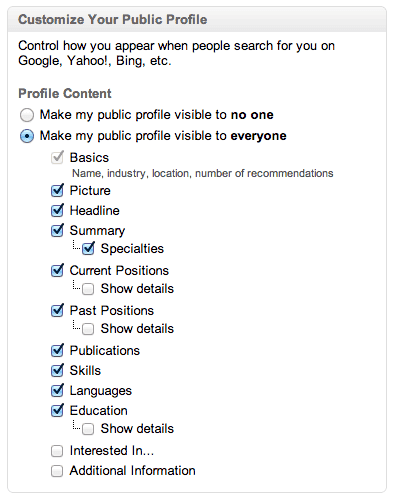
new linkedin profile search engine settings 

3.) Get Active!

In the world of online marketing, what appears “above the fold” on your website is critical in that this is the content a viewer will see without having to scroll down. What features prominently in the new profile is your “Activity,” or status updates as well as other actions that you perform on LinkedIn, which wipes out all but the title of your professional summary. This makes your most recent LinkedIn status update all the more crucial as it will be featured rather prominently above the fold and visible to all who view your profile. LinkedIn’s decision to prevent you from automating publishing every tweet as a status update was a welcome move to make your network updates more professional, but you still need to ask yourself before posting any status update if they are truly 1) professional and 2) aligned with your branding. You also want to make sure you post at a certain frequency, say a minimum of once a week, so that your latest update doesn’t seem stale and out of date. You can easily use LinkedIn Today to curate relevant content to share with your network, so now’s the time to make that feature part of your LinkedIn routine.


8.) Increasing your Connectivity and Commonalities

My final LinkedIn profile tip is a general one about increasing both your connectivity as well as commonalities on LinkedIn. Why? Because you want to create as many data points as possible to allow relevant people you are trying to easily reach out and start a conversation with you. All of this information is being displayed in the righthand side of anyone who visits your profile, so maximize this functionality by increasing your connectivity and commonalities as follows:

Connections:

Every additional connection you make gives you the ability to find, and be found, by many more people. Although this doesn’t appear on all profiles yet, the below image gives you a feel for how prominently your connectivity status with a 2nd degree connection will be shown:
linkedin new profile common connections display visual
Increase your LinkedIn connections to increase your connectivity to any given user.
If you haven’t added any new LinkedIn connections for awhile, see my video below for how many LinkedIn connections I recommend you should have!
[youtube=http://www.youtube.com/watch?v=xXegeRJkvu0&w=480&h=360]

Groups:

Being a member of the maximum 50 groups will increase your connectivity AND commonality with any given profile by not only showing the common groups that you are both a member of, but also by allowing that 2nd degree or beyond connection the ability to easily message you by going to that common group.

Skills:

Imagine if you’re trying to attract CMOs to your profile, yet your Skills and theirs don’t overlap. Wouldn’t that be strange? Showcasing commonality in skills with those who you are trying to attract to your profile should be another priority in helping you increase your thread of commonalities. Of course, if you’re trying to attract an audience that has nothing in common with you it is one thing, but just by looking at the skills that a representative sampling of the audience you want to attract have and aligning a few of your skills where appropriate could make a positive impression by showing off your commonality in this area. As LinkedIn continues to roll out the new user interface to its user base (I only got mine this week), I am sure that we will see more changes as they continue to implement their vision for their platform. However, the above profile tips are the things that you can do immediately to truly maximize the potential for the new personal profile page user interface. Any other profile tips that you would add? Please chime in!

See all 8 tips and the complete NealShaffer post


Stop Ignoring Your LinkedIn Profile. Best Ways To Update It Now

Robin Ryan
Today I worked with Susan, 59, an IT Manager working in the healthcare field. She has been working in her company for over 20 years. She has ignored LinkedIn as she likes her job, that is, until awhile ago. Her manager changed, and a promised promotion went to someone else. Her husband encouraged her to job hunt, and she contacted me to help her write her LinkedIn Profile. 
Susan didn’t have a profile. No connections, no professional experiences, no skills, — she had nothing. As a career counselor who writes 4 or 5 LinkedIn profiles a week, I haven’t had anyone recently who had no LinkedIn presence at all. Then, today I worked with Dominick, 60, and he just lost his job. He has decided to go ahead and formally launch his consulting business and wanted help creating his LinkedIn profile. He also didn’t have anything written on his LinkedIn Profile page, confessing he didn’t think he needed it before.
Last week, I had two people who had Profiles with nothing really on them besides their current job title and a photo. I thought, “Could this be a baby boomer trend from the coronavirus? Are people who have no profiles deciding to join the world’s largest professional network?” You have to wonder. We hear so much about the importance of a well written and up-to-date LinkedIn profile; I question how people are missing that career message. I can’t stress enough that you need a well-composed LinkedIn Profile. Ask any career counselor, and they will agree with that statement. 
Whether it’s because you lost your job, or are taking a new career path, or want a better position, your LinkedIn Profile is crucial to your job search. There are still some companies hiring. There are still recruiters searching for candidates on LinkedIn every day. You don’t want to be embarrassed when a recruiter, hiring manager, or a colleague comes to look at your profile. You want to be proud of who you are and what you have accomplished. Since 90% of America is stuck at home, now is the right time to make an effort to update your LinkedIn Profile. 
Making More Connections
You won’t automatically start getting all kinds of action if you don’t have any connections. LinkedIn says that having connections with people you know is vital. It is also how the algorithm works. You want to try to connect with 300 or more people. You need that many to make LinkedIn effective in noticing you. Who makes good connections? Current and past bosses, coworkers, professional colleagues, association and club officers, friends, college classmates, and business owners. Start making requests. Just note that you are limited and can only send 30 individual invitations per day.
Here is a much faster way to get connections. LinkedIn has made it easier to add your email contacts to build your social network....  Read the full Forbes article to find out how and more tips and tricks.
 

Here's How You Optimize Your LinkedIn Profile to Strengthen Your Personal Brand

By Amy George

Here's a question I get asked a lot: Do you do SEO on clients' LinkedIn profiles? The answer: Yes.
There are steps I take to increase the chances that profiles I work on turn up in Internet searches and LinkedIn searches, too. And you can use these strategies to optimize your own professional profile.  


1. Sprinkle keywords throughout your profile.

Think about the terms people would use to search for someone with your expertise. These are your keywords, and you should sprinkle them throughout your profile, starting with your headline.
With your headline think of the words that prospective clients and recruiters would use to find someone like you. Think job function, specialty and career tenure. For example, Marketing Director and Senior Communications Strategist conveys long established marketing and communications expertise. Marketing Director and Senior Financial Communications strategist adds another layer, specific industry experience. 
Make sure current and past titles and job descriptions -- those in the Experience section -- are likewise optimized.
In the About section, which is the bio section, I recommend using keywords but only to the degree that they don't interfere with telling a story. This section is less about stringing together industry words and more about telling a story that makes you stand out. Think of it as your "why" -- why you do what you do and how you got here -- versus a listing of accomplishments, which is what the Experience section is for.

3. Use hashtags in your posts.

When you post to LinkedIn, use hashtags that correspond to your keywords. For example, when I share stories that I've read or written about LinkedIn or public relations, I include hashtags like #linkedin #linkedmakeover #publicrelations #PR.
I recently asked a LinkedIn makeover client who lives in New York how she found me. It was simple. She was searching on LinkedIn. This happens a lot. It works.

See all the steps and the complete Inc. article


7 of the Best LinkedIn Tips for Professionals

LinkedIn is the world’s largest professional network with over 660 million users from 200 different countries. This makes it too big of an opportunity for you to ignore.
It is especially great for B2B marketers as the platform has over 63 million decision-makers from different companies and industries. This presents an unmatched opportunity for B2B marketers to connect with potential clients and generate qualified leads. 
And, these are just two of the many LinkedIn stats that can convince you of its value as a marketing platform, especially for B2B marketers. But is LinkedIn just meant for B2B marketers? No! Anyone can benefit from LinkedIn by establishing a solid presence on the platform and amassing enough followers. All you need is a push in the right direction and that’s what we are here for.
In this post, we will discuss 7 of the best LinkedIn marketing tips with you that actually work. You can use them to build your brand on LinkedIn and beyond.

5. Sponsor Your Winning Posts

As we all know, some of the content that we create works and some doesn’t. 
The smart thing to do is capitalise more on the content that does well to get the maximum benefit out of it. That is where LinkedIn’s “sponsored content” option comes into play.
Wait… What is sponsored content?
Sponsoring content is basically like native advertising on the platform. You can sponsor your best content to have it shown on the feeds of your target audience even those users outside of your professional network. This increases the reach of your content and gets it more views from the right audience. This is an excellent way to market yourself and get noticed by the bigshots in different companies, who could be potential clients.

7. Leverage LinkedIn Analytics

No marketing initiative is complete if you don’t track and measure its performance. LinkedIn has a built-in analytics tool that can help you see how your efforts on the platform are going. Using the “Company Page Analytics” feature you can assess how your company page is performing. You can specifically see which updates are getting the highest engagement and which ones are a complete failure.
You can then use those insights to fuel your future marketing efforts and create more engaging content. So, if you haven’t used LinkedIn analytics yet, try it now.

10 ways to make your LinkedIn profile stand out to recruiters

Why Authenticity Is the Sole Tactic You Need to Succeed on LinkedIn

By Robbie AbedAuthor, writer, and founder of Firemeibegyou.com


I truly believe that LinkedIn is the most powerful social network of all of the major social networks, including Facebook, Twitter, and Instagram. LinkedIn is where business happens, plain and simple. And if you're an entrepreneur starting a company that you hope will be big one day, you simply can't ignore this powerful social network.

I've been on LinkedIn since 2006, and it has single-handedly changed my career and entrepreneurship trajectory. It has provided me with new career opportunities, new business partners, employee referrals, and connections to wealthy investors. For entrepreneurs, LinkedIn works really well.

I've been able to amass over 30,000 connections on LinkedIn, and that number continues to grow every day. To achieve this success, I've used a single approach that has worked since day one: authenticity. If anything sells on LinkedIn, it's this.

Every year, I post a reflection called "Robbie's Last Year: The Good, Bad, and Ugly," where I talk about everything that happened with my company and even my personal life. Every year, this post consistently generates the most comments, likes, shares, and even InMails (LinkedIn's messaging system). 

Many of the comments and InMails that are sent to me are from people who have had the same struggles I've had. Many of these people are strangers that I've never interacted with before, and they're opening up to me about their life and business struggles. I'm able to forge new connections and new business opportunities by simply being genuine and talking openly about my successes and failures.

If you want to build better relationships with your connections, this is easily the way to go. Many of your connections read your content every time you post it but never comment, like, or share it. And since LinkedIn doesn't tell you exactly who's viewed your content, you're left in the dark.

When I write authentically and talk deeply about a subject that's either taboo or just not talked about enough, my engagement skyrockets. The "lurkers" who usually don't like or comment on posts actually start engaging with my content. By writing authentically, you've given them permission to open up to you as well.

Read the rest of the Inc.com article

LinkedIn Career Expert Says to Get Your Next Job, Your LinkedIn Profile Should Have These 7 Simple Things

By Peter Economy

Your LinkedIn profile serves as your first impression with potential employers. And 65 percent of people believe that the impression you make online is just as important as the one you make in person. So, making a great first impression is key to landing your next opportunity.

Check out seven tips from LinkedIn career expert, Blair Decembrele, on how to perfect your LinkedIn profile.

5. Ace your summary.

Think of your summary as your "about me." Try to sum up your experience in about 40 words and make sure you include any keywords and/or skills that you've seen featured in descriptions for jobs that seem interesting to you. A robust summary section makes your profile more likely to show up in a hiring manager's search and gives you the opportunity to share more about yourself.

6. Ask for recommendations or referrals.

Asking for recommendations from a peer, manager, direct report, professor, or client on your profile is a great way for hiring managers and recruiters to see what others say about your work. Or even better, if they are connected to someone at the company where you want to work, ask them to refer you. Job applicants who are referred by an employee are 9X more likely to get hired. 

7. Put your profile to work.

Once you've set up or refreshed your profile, start searching the 20+ million jobs on LinkedIn, and set up job alerts so you're among the first to be notified when a relevant job is posted. Applying for a job within the first 10 minutes of receiving a relevant job notification increases your chances of hearing back by up to 4X.

See all 7 things and the complete Inc. article


LinkedIn listed 10 skills with the highest demand in 2020

By

What skill does the workforce value most? What are the 10 skills that are the highest in demand in 2020?

Recruiters around the world have a front-row seat to the changing mix of skills most prized in the business world. And understanding what those skills are can give you a tremendous boost. But these skills tend to change gradually over time. And only the most sought-after hard skills evolve in a light-speed, pushed mostly by the relentless transformation of the technology.

Here are LinkedIn’s 10 skills with high demand in 2020:

1. Blockchain

6. Business analysis

7. Affiliate marketing

Blockchain

Blockchain, in essence, is a growing list of records called blocks that are linked using cryptography. Originally, blockchain was invented by someone you probably know called Satoshi Nakamoto.

It was first invented in 2008 in order to serve as the public transaction ledger of the cryptocurrency bitcoin. And with that, the first digital currency to solve the double-spending problem without the need for a trusted authority was solved.


What is a blockchain?

 See all 10 Skills, their explanations and the complete LearnWorthy article

How To Let Recruiters Know You’re Open To A New Job Using LinkedIn

Robin Ryan

I was working with Tim, a 57-year-old career counseling client, and we were creating his LinkedIn profile. He was surprised when I mentioned that you could turn on a feature that would allow recruiters to find you and know that you are open to new job opportunities. I just assumed that he was only one of a few who might not know how to do this feature yet three days later I had another Baby Boomer client doing her LinkedIn Profile creation, and that client was also surprised that LinkedIn had this feature. Although it’s not a brand-new feature, you don’t want to miss out on having this tool turned on. 

If you are open to a new job, you are going to want to use this so recruiters can find you. It’s a signal that goes out only to recruiters, so you don’t have to worry about your boss or any employees from your company finding out that you’re looking for a job. This is great because, for some of you, it’s risky to state on LinkedIn (like in the About summary section) that you’re looking for a job. Think about what might happen if your boss goes to your Profile and sees you advertising yourself to other employers. That could be a very uncomfortable conversation. This LinkedIn feature “hides” your signal from your current employer. That’s why this feature is a great one to use. It works behind the scenes. 

According to LinkedIn, 94% of recruiters search LinkedIn for job candidates. 94%. They know that most of the talented applicants are already working. They want to find you, and by using this feature, you will enable recruiters to locate you more easily. 

Turn On Your Notice to Recruiters - Read the rest of the Forbes article to see how plus other advice...