While LinkedIn dominates as the most popular social media site for
both job seekers and companies to find networking opportunities and
build professional connections, new trends constantly emerge, and the
role of the platform is always evolving. To make the most of their
LinkedIn presence, users on both sides of the recruiting equation need
to stay aware of these trends and know how to leverage them.
For job seekers, tapping into these trends can get you noticed before
the rest of the crowd—and in a saturated market, that could mean the
difference between landing a job or losing out to other candidates. For
recruiters, staying up on trends will help maximize the number of
qualified candidates you have access to, which affords a breadth of
options.
To find out how job seekers and recruiters can prepare to make the most of them, we asked 11 members of Forbes Coaches Council for their predictions around up-and-coming LinkedIn trends. Here's what they told us.
1. Moving Toward Online Training And Certification
LinkedIn is making its move toward distance education and online
training, offering fresh courses such as digital marketing and social
media management. Plus, it gives the opportunity to update your new
achievement in your profile and connect with people with the same
qualifications. Its variety is extensible, and soon enough, LinkedIn
will compete with colossal certification organizations. - Jill Douka MBA, MCC, Global Academy Of Coaching
7. Becoming A Unique Source Of Candidates
My crystal ball says that, within five years, companies won't seek
applications online; they will just source directly from LinkedIn. They
will find the candidates based on algorithmic searching and AI and
decide which ones they want to talk to. Candidates should prepare now in
two ways: First, make sure your profile has relevant words, and then,
learn networking for job search to reach the hiring team. - Dana Manciagli, Job Search Master Class
8. Expediting Social And Professional Proofing
Social and professional proofing will begin to carry greater weight
as professionals want to know "who is endorsing this individual." With
this, LinkedIn recommendations will begin to become more of a focal
point. Recruiters and job seekers can prepare by tailoring their current
functions to incorporate (review, consider, rank, track, etc.)
recommendations. - Corey Castillo, Truth & Spears
See all 11 trends and the complete Forbes article
These 7 mistakes on your LinkedIn profile are killing your job search
BY GWEN MORAN
The team at digital selling firm Vengreso was ready to hire an instructional designer. They found someone on LinkedIn who seemed perfect for the job, and he likely would have gotten an offer after a cursory interview. But there was just one problem, says co-founder and Chief Visibility Officer Viveka von Rosen: He had no contact information listed.
That was the “final straw” from an already weak profile, says von Rosen, author of LinkedIn Marketing: An Hour a Day. Sure, she could have messaged him through the platform, but they didn’t know how long it would take him to check for messages and the fact that his profile made it more difficult than necessary to contact him was a deal-breaker. The team moved on to look for someone else. “Update your contact information and consider including it in your summary, too,” she says. “Make it easy for them to find you.”
You may have built your LinkedIn profile and network over the course of years–or you may pay little attention to it at all. Either way, your profile may have red flags to recruiters or hiring managers, undermining your job search. But refreshing it doesn’t have to take long. In addition to keeping your contact information up-to-date, here are seven more red flags to keep in mind.
MISTAKE #1: A MISLEADING HEADLINE
The headline next to your photo is one of the most valuable pieces of LinkedIn real estate you have. Use it wisely, says executive recruiter and career advancement coach Suzanne O’Brien. If you have aspirations of moving up, don’t use your current title in your headline. Instead, opt for something that reflects the job you want without being misleading. “Try using something that encompasses your current role and where you want to go, along with your unique value,” she suggests. For example, “Leadership in Product Management with Mobile and Healthcare Expertise” or “Marketing Professional for High-Growth Companies.”
“For the company that’s looking for someone with that expertise, they’ll know right away that you’re a ‘bull’s-eye’ candidate and they want to speak with you,” she says. Avoid very broad descriptions like “Consultant” or “Tech Explorer with a Systematic Approach.” Also, it’s not the best place for a quote from your favorite author, she says.
MISTAKE #4: RESUME MISMATCH
If you do nothing else before your next job hunt, do this: Pull up your resume and compare it side-by-side with your LinkedIn profile, Boggs says. Make sure the dates, positions, and job titles match. When resumes and LinkedIn profiles aren’t aligned, recruiters don’t know what to believe, she adds.
5 Tips To Game The LinkedIn Algorithm
Does LinkedIn keep pushing your posts down to the bottom? Are your posts constantly flagged as ‘low-quality?’ The Problem is that you don’t know how LinkedIn thinks. There are some simple ways to boost your visibility across the site, increasing your social media presence.
1. Add Followers
You can’t be seen on LinkedIn if you don’t have many connections. It’s very easy to add some; go to the “My Network” tab, then you have three options. There is the recommended section, people that LinkedIn thinks you might know. Then, the individual search, which isn’t the most effective way to add connections fast, but if you want some specific people in your feed, this is a great way to do it. Finally, there’s the import personal contacts tab, which is a fantastic way to add most people that you already have the contact information for. You can literally import your entire list from Gmail or Outlook and double your LinkedIn connections overnight.
** If too many people reject your connection requests you can have you account locked. Send out a smaller batch each day instead of sending out to your entire contact list...
4. Find Your Audience
It is better to have a group of 100 people who constantly comment, like, and share, than 10,000 people who never interact with you. Think of it as a web. The average user has 450 connections; if you have chosen these 450 connections very wisely and they all like to share and comment, each one of those 450 connections are sharing to their 450 connections. The numbers get very large, very quickly. You also have the potential for these article to spread beyond the first two degrees, this is what makes the viral nature of social media so intriguing. So, find an audience that likes your posts is willing to like and share them.
See all 5 tips and the complete Forbes article
5 Tips To Build Your Personal Brand On LinkedIn
Vidhi Bubna
Since LinkedIn was founded in 2002, it has grown to a community of 660 million-plus members. LinkedIn has opened new arenas of usability for professionals on the platform. Benefits of using LinkedIn extend beyond networking, increasing job opportunities, finding business leads as the platform creates several intangible benefits like creating a personal brand name and increasing credibility.
“Everyone is trying to build their personal brand on LinkedIn. It’s not just top level management and well established leaders, but also students, freelancers, start-up founders and hustlers. Everyone recognizes the benefits of a large following and high engagement on the platform and users want to leverage the platform to take advantage of the benefits of personal branding,” according to Tannisha Avarrsekar, founder of Lokavyuha Strategy and Communications.
Though the platform can be leveraged to create several benefits for its users, gaining visibility and personal marketing on the platform has become increasingly challenging. The most common tips given by personal branding experts include posting a professional personal profile picture on the platform, updating skills, education and work, and posting regularly and commenting.
Since most of the users are now aware of these basic tips, there is no real profile differentiation or branding created by incorporating these strategies on the platform. Posting regularly is not the ‘key mantra’ for personal branding on LinkedIn anymore, because posting regularly may not increase your visibility or network. LinkedIn marketing in 2020, in the era of COVID uncertainty calls for a different approach for building a personal brand on LinkedIn.
“Sharing content of other influencers is a great way to leverage the platform to your advantage. You don’t need to have original content to post, reposting content which is different and giving the creator credit for it helps to boost your own profile. Your main aim should be posting great content, even if it means reposting articles, research papers or posts if you don’t have time to create content yourself,” says Avarrsekar. Reposting content of influencer’s also increases the quality of content on your feed itself, ensures high reach and engagement.
Moreover, sharing content of LinkedIn influencers increases your reach within the influencer’s network itself. Hence, the ‘share’ tool on LinkedIn is a quick way to increase engagement and build your network and it is definitely easier than posting original content.
Harsh Karamchandani, co-founder of ed-tech start-up Edunify, explains “You don’t need to be a popular personality to establish your personal brand on the platform. The platform empowers everyone because it gives everyone a voice. You can use the power of storytelling on the platform to highlight your personal life experiences which other people can learn from. Being the co-founder of a start-up, I use the power of storytelling to narrate my journey, experience and challenges, and my stories resonate with other aspiring start-up entrepreneurs which increases my engagement.” Storytelling also creates a personal brand which is more genuine and real because users can see the real person behind the LinkedIn profile.
Most often people hesitate before posting their failure stories on LinkedIn. Posting about failures on LinkedIn can increase engagement and depict a strong personality based on constant learning. According to an article written by Vani Kola, managing director of Kalaari on LinkedIn “Is failure the new success?”, failure creates constant learning in one’s life and reflecting on failure is the path to improvement. Owning up to your failure’s on LinkedIn shows that you are willing to own up to your mistakes, learn from them and grow.
Posting about failures is an important part of personal brand building because it resonates with the audience via storytelling. Personal stories are likely to get more engagement and reach on the platform because they directly connect with the audience and display the real person behind the LinkedIn profile.
The power of storytelling can also be extended to highlighting the stories of people associated with your brand. Prerna Mukharya, founder of Outline India, a data firm focused on ground level impact, explains how Linkedin can be a powerful tool to meet the right people. “One of our initial projects at Outline India was through linkedin and I have not forgotten that. It is essential to stay authentic as one tries to make a point. Personal stories (stories from the field in our case about data collection), have been instrumental in reaching out to our target audience. I receive about 7-10 messages each week from people across the spectrum, sharing appreciation, kind words or looking to contribute to our greater goal of - creating social impact through data. In most cases, I do not know these people, but they are willing to offer their expertise, and their time to know about our story at Outline India.” Mukharya says. Hence highlighting stories of people who you are working with and interacting with is a part of your own storytelling and can be leveraged to create your personal brand.
Though it may be challenging to increase the visibility of your posts, increasing visibility in an article can be much easier because only 0.2 per cent users on LinkedIn have published articles on the platform.
Here are a few general tips you can keep in mind when you are writing an article to create your personal brand on the platform. The tips are based on research conducted on LinkedIn publisher statistics:
- Write long form articles, around 1,900 words to get the best engagement.
- Post “how-to” and list format articles because they get higher number of shares
- Split the article into 5, 7 or 9 sub headings
- Ensure that the article title is 40-49 characters
- Do not add videos to the article unless absolutely necessary
- Try to add exactly 8 photos to the article
- Post some original images with people’s faces in the article
See all 5 tips and the complete Entrepreneur article
Since LinkedIn was founded in 2002, it has grown to a community of 660 million-plus members. LinkedIn has opened new arenas of usability for professionals on the platform. Benefits of using LinkedIn extend beyond networking, increasing job opportunities, finding business leads as the platform creates several intangible benefits like creating a personal brand name and increasing credibility.
“Everyone is trying to build their personal brand on LinkedIn. It’s not just top level management and well established leaders, but also students, freelancers, start-up founders and hustlers. Everyone recognizes the benefits of a large following and high engagement on the platform and users want to leverage the platform to take advantage of the benefits of personal branding,” according to Tannisha Avarrsekar, founder of Lokavyuha Strategy and Communications.
Though the platform can be leveraged to create several benefits for its users, gaining visibility and personal marketing on the platform has become increasingly challenging. The most common tips given by personal branding experts include posting a professional personal profile picture on the platform, updating skills, education and work, and posting regularly and commenting.
Since most of the users are now aware of these basic tips, there is no real profile differentiation or branding created by incorporating these strategies on the platform. Posting regularly is not the ‘key mantra’ for personal branding on LinkedIn anymore, because posting regularly may not increase your visibility or network. LinkedIn marketing in 2020, in the era of COVID uncertainty calls for a different approach for building a personal brand on LinkedIn.
2) Share Posts of Other Influencers Which Are Relevant
Though most LinkedIn influencers recommend posting content on the platform regularly to increase engagement, often they take for granted that not everyone has the time to create original posts on the platform. Creating an original post or article may be time consuming and challenging to do on a daily basis. However, it may be easy for you to repost relevant content on the platform to keep your audience engaged.“Sharing content of other influencers is a great way to leverage the platform to your advantage. You don’t need to have original content to post, reposting content which is different and giving the creator credit for it helps to boost your own profile. Your main aim should be posting great content, even if it means reposting articles, research papers or posts if you don’t have time to create content yourself,” says Avarrsekar. Reposting content of influencer’s also increases the quality of content on your feed itself, ensures high reach and engagement.
Moreover, sharing content of LinkedIn influencers increases your reach within the influencer’s network itself. Hence, the ‘share’ tool on LinkedIn is a quick way to increase engagement and build your network and it is definitely easier than posting original content.
3) Leverage The Power of Storytelling to Enhance Your Personal Brand
Sharing your personal story on the platform creates a more human touch and makes your personal brand relatable to other users on the platform. Moreover, this strategy is easy to use because writing about your own experiences from memory takes less time than doing research to create a post.Harsh Karamchandani, co-founder of ed-tech start-up Edunify, explains “You don’t need to be a popular personality to establish your personal brand on the platform. The platform empowers everyone because it gives everyone a voice. You can use the power of storytelling on the platform to highlight your personal life experiences which other people can learn from. Being the co-founder of a start-up, I use the power of storytelling to narrate my journey, experience and challenges, and my stories resonate with other aspiring start-up entrepreneurs which increases my engagement.” Storytelling also creates a personal brand which is more genuine and real because users can see the real person behind the LinkedIn profile.
Most often people hesitate before posting their failure stories on LinkedIn. Posting about failures on LinkedIn can increase engagement and depict a strong personality based on constant learning. According to an article written by Vani Kola, managing director of Kalaari on LinkedIn “Is failure the new success?”, failure creates constant learning in one’s life and reflecting on failure is the path to improvement. Owning up to your failure’s on LinkedIn shows that you are willing to own up to your mistakes, learn from them and grow.
Posting about failures is an important part of personal brand building because it resonates with the audience via storytelling. Personal stories are likely to get more engagement and reach on the platform because they directly connect with the audience and display the real person behind the LinkedIn profile.
The power of storytelling can also be extended to highlighting the stories of people associated with your brand. Prerna Mukharya, founder of Outline India, a data firm focused on ground level impact, explains how Linkedin can be a powerful tool to meet the right people. “One of our initial projects at Outline India was through linkedin and I have not forgotten that. It is essential to stay authentic as one tries to make a point. Personal stories (stories from the field in our case about data collection), have been instrumental in reaching out to our target audience. I receive about 7-10 messages each week from people across the spectrum, sharing appreciation, kind words or looking to contribute to our greater goal of - creating social impact through data. In most cases, I do not know these people, but they are willing to offer their expertise, and their time to know about our story at Outline India.” Mukharya says. Hence highlighting stories of people who you are working with and interacting with is a part of your own storytelling and can be leveraged to create your personal brand.
5) Don’t Forget to Leverage the Power of a LinkedIn Article
While communication experts recommend making posts on LinkedIn regularly, very few focus on the power of writing articles on the platform. Around 45 per cent of the article readers on LinkedIn comprise upper level management. Hence, writing articles on the platform increases the possibility of you connecting with upper level management which increases your rating on the platform and boosts your following. Moreover, building relationships of increased engagement by top level management and getting their comments on your posts ensures more credibility towards your personal brand.Though it may be challenging to increase the visibility of your posts, increasing visibility in an article can be much easier because only 0.2 per cent users on LinkedIn have published articles on the platform.
Here are a few general tips you can keep in mind when you are writing an article to create your personal brand on the platform. The tips are based on research conducted on LinkedIn publisher statistics:
- Write long form articles, around 1,900 words to get the best engagement.
- Post “how-to” and list format articles because they get higher number of shares
- Split the article into 5, 7 or 9 sub headings
- Ensure that the article title is 40-49 characters
- Do not add videos to the article unless absolutely necessary
- Try to add exactly 8 photos to the article
- Post some original images with people’s faces in the article
See all 5 tips and the complete Entrepreneur article
Make these 4 LinkedIn profile updates now to get more job offers
By Abhijit Tamhane
Here are a few new ways to update your LinkedIn profile to give you an edge as a job seeker.
And if you don’t have all of the required skills for the job you want, online learning is a great way to build them and increase your chances of getting hired.
See all 4 updates and the complete Fast Company article
Just one of these strategies used on a LinkedIn profile made them discovered up to 27 times more in searches by recruiters.
If you’re on the hunt for a new job, there are few tools more powerful than your LinkedIn profile.
It’s a one-stop shop for recruiters and hiring managers to learn more
about your professional story, so make sure your profile represents not
only your experience and strengths but also your goals and what you want
to accomplish.
Here are a few new ways to update your LinkedIn profile to give you an edge as a job seeker.
1) Signal to your community that you’re looking
With the Open To Work feature on your LinkedIn profile, you can quietly signal to recruiters that you’re open to new opportunities, and you can now engage your entire professional community in your search. To let the broader LinkedIn community know you are looking, just add an #OpenToWork photo frame on your profile photo. By doing so, when your profile comes up in a search or shows up in the feed because you comment on or “like” a post, professionals beyond your LinkedIn connections will see your #OpenToWork photo frame and can connect you to job openings they’re aware of or facilitate an introduction to a hiring manager. We know that candidates on LinkedIn are nearly four times more likely to land a job at a company where they have connections, so imagine the possibilities of reaching LinkedIn’s community of 700+ million professionals.2) Spotlight your skills
Recruiters view skills as critical when looking at job candidates. In fact, we’ve found that members with five or more skills listed on their LinkedIn profile are discovered up to 27 times more in searches by recruiters. That’s why it’s important to list your skills—both hard and soft—on your profile. If you want to turn it up a notch, you can now validate your hard skills with 95 Skill Assessments that you can test against. Once you complete an assessment, a badge gets added to your profile which highlights your proficiency.And if you don’t have all of the required skills for the job you want, online learning is a great way to build them and increase your chances of getting hired.
See all 4 updates and the complete Fast Company article
Here Is A LinkedIn Secret Weapon To Land A Job
Kathleen contacted me because this baby boomer needed career assistance. Her husband had gotten an executive position in a new state, and they were moving halfway across the country for his opportunity. That meant that she was going to be leaving her program manager position behind as the job had was only part-time after the COVID-19 pandemic happened.
She found a Program Manager job that she was exceptionally well-qualified for at a Fortune 500 tech company. She said she wanted to apply, but marketing herself was not her strong suit. Kathleen stated she needed a professional resume writer and LinkedIn Creator to be able to demonstrate that she had the skills to do the job. We discussed the challenges and culture of trying to switch industries as she was coming from a nonprofit organization wanting to move to a tech company. One of the things I mentioned to her was it would be beneficial if Kathleen looked through her LinkedIn connections to see if she knew anybody at the targeted organization. To my surprise, she said, “Oh yes, I do know someone there. The two of us met at a conference I attended, and he was sitting next to me in one of the sessions.” My next question was, “Will he remember you?” And she said,” I don’t know, but I’ll reach out and see if he does.”
So she sent him a message and didn’t hear back. She had his phone number and then called him. After some prompting about where they met, he vaguely recalled who she was. Kathleen did ask if he was willing to pass on her resume to his employer. He said, “Sure, send it along.” That led to the resume going to the appropriate people internally. A few days later, she got a call from the internal recruiter talking to her about the job. She described this as her dream job. It took four interviews, but she did indeed land the coveted position.
As the job market heats up and gets more crowded due to all the layoffs from the pandemic, internal employee referrals are going to make even more of a difference than before. Some companies also pay their employees a fee if they refer someone who is hired and remains at least a few months.
Michael worked in the finance office for a small manufacturer that had 600 employees and his company was looking for a new sales rep. Lief found the opening and then checked his LinkedIn connections to determine if anyone he knew worked their. He had Michael as a connection. He reached out and ask Michael if he’d send his resume on to the company’s recruiter. It worked. Leif got an interview. After two interviews and passing the company’s personality test, Leif started working there two days ago.
Referrals are powerful. And today, getting a referral is a secret weapon to get through the crowd and be seen by recruiters, HR, and hiring managers. Anytime an internal employee refers someone, that person receives a solid review. Jobvite, a talent acquisition system reported that employee referrals only make up about 7% of potential candidates, but the number of those referred candidates hired is 44%. That makes this well worth the effort to try and locate a connection to someone inside the company. LinkedIn is the ideal place to search for connections and get a referral.
Here are some Dos and Don’ts to follow when you utilize this strategy.
Read the Dos and Don'ts and the complete Forbes article
90 Trending LinkedIn Hashtags to Expand your network and engagement
Ketan Parmar
When it comes to using social media for professional purposes, no other platform can match the level of LinkedIn, itself. LinkedIn is the best professional platform, allows us to connect and socialize with likeminded people having the same career aspects. As social media for professionals, LinkedIn is a reliable platform amongst online marketers, business owners, HR departments, and content creators, to develop their networks.
Linkedin hashtags are a very powerful tool to use, especially when you are actively using it for building your brand. Similarly, on most other social media hashtags, LinkedIn hashtags are also a way to reach a larger audience with targeted interest. For that understanding which hashtags to use in your content, becomes crucial to growing your network.
So in this post, we are sharing you some of the best trending LinkedIn hashtags, you better to use in your next posts. Such hashtags are widely used by professionals, and support your post to reach its maximum post expectations. Ultimately, that helps you to present your message in front of the right audience. But, the first question is,
Do Hashtags Work on Linkedin?
The short answer is, absolutely. Yes. As a social media community and not just a job searching platform, Linkedin is the top leading online communities for professional peoples. And yes, hashtags at LinkedIn are also a powerful way to promote your post and reach it to the maximum exposure.Like other social media like Twitter, Instagram, LinkedIn hashtags are also widely used to push the content to a wider audience. When being used wisely, mean relevant topical hashtags can boost the post impressions and so the engagements in return.
These are also a better way to reach the target audience and present them with your unique ideas through the posts. You can use hashtags on Linkedin at every type of content from text to visual format contents.
So, if you are at Linkedin to promote your brand and drive more brand mentions, then you better to use relevant hashtags that fit your industry area. For that, search with some relevant hashtags that you can add in your regular posts.
Not limited to marketing perspective only, but as you know that Linkedin is a better place to find your next job and project as well, you can share the post about vacancies at your company there too. And, yes with using the right hashtag in a job updating post you can reach the right candidate seeking the same job profile.
If you are looking for some trending LinkedIn hashtags to grow your network and promoting your services right way, then here is the list for you.
Trending LinkedIn Hashtags 2020
- #Networking
- #Workfromhome
- #Homeoffice
- #workingathome
- #Life
- #Entrepreneurship
- #Work
- #Success
- #Creativity
- #Inspiration
Popular LinkedIn Hashtags for Management
LinkedIn Hashtags for Digital Marketing
Best LinkedIn Hashtags for Business
LinkedIn Hashtags for Hiring
Top LinkedIn Hashtags for Lawyers
Best LinkedIn Hashtags for Self-help Posts
LinkedIn Hashtags for Job Seekers
AND
Why Using LinkedIn Hashtags is Important?
Quick Tips to Use LinkedIn Hashtags
4 Ways to Increase Your Profile's Ranking on LinkedIn - What can job seekers do to attract a recruiter’s attention on LinkedIn
By Nancy Collamer
It’s critical to increase your profile’s ranking on LinkedIn so you’re more visible to recruiters. There are four ways to do that.
Two: Expand your network. Having a large network boosts your LinkedIn search ranking. So, be sure to reach out to people like former colleagues, classmates and neighbors on a regular basis. The more people you have in your network, the greater the likelihood that a recruiter will find you through your connections.
This is especially useful for connecting with recruiters at smaller companies, who typically don’t pay for the premium LinkedIn Recruiter tools. Since they don’t have access to expanded search capabilities, they depend on first and second-degree connections to source candidates.
Four: Be active on the site. Maintaining an updated LinkedIn profile shows recruiters that you’re professionally engaged. Share relevant content, comment on other people’s articles and link to articles you’ve written.
See all 4 ways and the complete Forbes article with more tips and info
It’s critical to increase your profile’s ranking on LinkedIn so you’re more visible to recruiters. There are four ways to do that.
Two: Expand your network. Having a large network boosts your LinkedIn search ranking. So, be sure to reach out to people like former colleagues, classmates and neighbors on a regular basis. The more people you have in your network, the greater the likelihood that a recruiter will find you through your connections.
This is especially useful for connecting with recruiters at smaller companies, who typically don’t pay for the premium LinkedIn Recruiter tools. Since they don’t have access to expanded search capabilities, they depend on first and second-degree connections to source candidates.
Four: Be active on the site. Maintaining an updated LinkedIn profile shows recruiters that you’re professionally engaged. Share relevant content, comment on other people’s articles and link to articles you’ve written.
See all 4 ways and the complete Forbes article with more tips and info
15+ Proven Tips To Build An Amazing LinkedIn Profile
Tip #2: Let recruiters know you’re open for business
One of the most frustrating aspects of being a job seeker is pouring hours into your resume, cover letter, or LinkedIn profile only to get zero responses.What’s the point of putting in all this work if no one’s going to see it?
A few years ago, LinkedIn aimed to fix that by rolling out their Open Candidates feature. Open Candidates lets you tell recruiters you’re open to new opportunities and it lets you set preferences for the types of roles you want to hear about.
Here are a few of the levers you can pull:
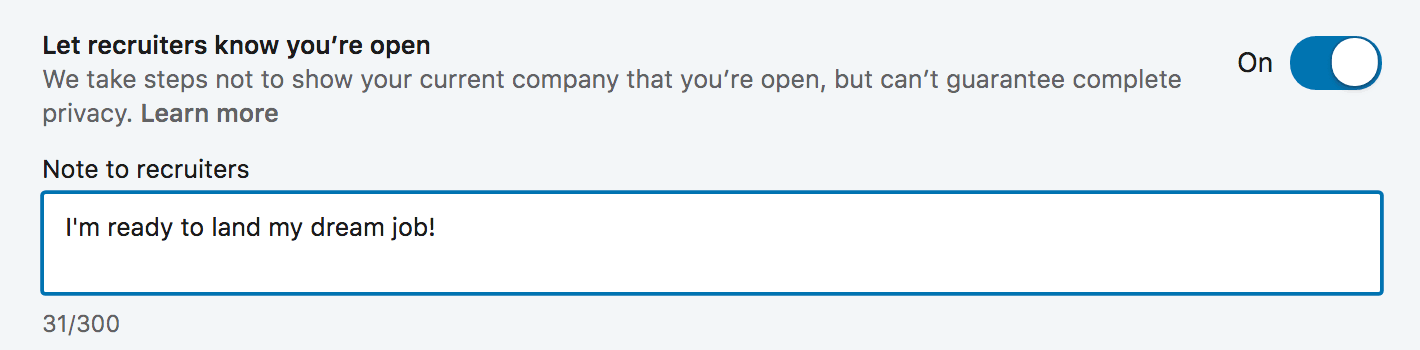
Leave Recruiters A Note: When you turn on Open Candidates, LinkedIn lets you leave recruiters a note (up to 500 characters) so you can provide some context around your situation and what you’re looking for next.
Your Status: Are you actively searching, passively looking, or not looking but open to the right offer? LinkedIn lets you choose any of the above so recruiters have a sense of where you’re at in your job search.
Target Roles: LinkedIn also lets you add the job titles you’re interested in/considering so recruiters can send you more relevant opportunities.
Location Preferences: Ready to make a move? Don’t want to move more than 10 feet from your kitchen table? Open Candidates also lets you tell employers where you want your next role to be. You can choose specific cities and you can also let them know you’re interested in remote roles.
Job Types: Finally, Open Candidates lets you tell recruiters what types of roles you’re open to. You can choose from Full Time, Part Time, Contract, Internship, Volunteer, or Temporary.
Once you have all of your preferences setup, the last thing you need to do is make sure you’ve flipped your Open Candidates switch to “On”:
Awesome! Now that we’ve got the easy stuff out of the way, this is where the fun begins.
Just because you let recruiters know you’re looking for opportunities, doesn’t mean you can put your LinkedIn profile on cruise control and watch the offers roll in. You’re still competing with 500 million other users for that job offer so you need to do everything possible to stand out.
The good news is you’re in the right place. The rest of this post is going to walk you through some LinkedIn profile tips that will set you head and shoulders above the competition and help you land more interviews, connect with amazing people, and rapidly accelerate your career.
LinkedIn Profile Tips: Optimizing From Top To Bottom
Now that we’ve got the basics out of the way, I’m going to show you how to completely optimize your LinkedIn profile to help you rapidly accelerate the results you’re looking for.When I was completely overhauling my profile, I found that it was easiest to start at the top and work my way down. I’m formatting this post to follow that same flow.
We’ll begin with the very top of your LinkedIn profile page – the URL – and then we’ll work down through your cover photo, profile picture, headline, summary, work experience, skills, recommendations, etc. until we’re covered every single aspect of your profile.
Tip #6: Optimize your LinkedIn headline to get more profile views
“On the average, five times as many people read the headline as read the body copy. When you have written your headline, you have spent eighty cents out of your dollar.” – David Ogilvy, The “Father” of AdvertisingThat advice is just as relevant to your LinkedIn profile as it is to writing ad copy.
In today’s job market, 90%+ of recruiters are regularly using LinkedIn to find qualified candidates.
When a recruiter is looking to fill a roll, they use LinkedIn’s search functionality to find awesome people like you. But what makes your LinkedIn profile show up at the top vs. the millions of other people in a similar field? Think of it like this:
Let’s say it’s 5pm on Saturday and you don’t feel like cooking. You might head to Google and punch in “best Thai restaurants [your city].”
Google serves a list of restaurants and you begin scanning through their offerings — their menu, reviews from other people, hours, distance, etc. Then you pick one based on what you liked best.
LinkedIn search works the same way!
Instead of searching for Thai food, recruiters are searching for keywords that match the position they’re hiring for.
For example, if they need a new Project Manager, they may search for: Project Manager, PMP, ACP, etc.
If they need a front end developer, they may search for: Front End Developer, Web Designer, Web Developer, etc.
When they hit “search,” LinkedIn scans profiles for relevant data and serves up the people who have the search criteria in their profile. The more your profile matches the search criteria, the higher you’ll show up.
Your LinkedIn headline carries a lot of weight in these searches so you need to make sure it’s fully optimized for the search terms that recruiters are using.
How to identify the keywords you need to use in your LinkedIn headline
Here’s a quick strategy you can use to boost your chances to matching with the terms recruiters are using to find candidates for roles you’re interested in:- 1Open a new Word/Google doc
- 2Use LinkedIn jobs to search for roles that match your exact criteria (industry, level of experience, location, etc.)
- 3For each role that lines up with your interests, copy the job title and paste it into your doc
- 4Rise and repeat until you have copied at least 30 job titles into your doc
- 5Now head to WordClouds.com and click on Word List, then Paste/Type text
- 6Paste in your 30+ job titles and hit Apply
The top 3-5 words are the keywords you want to focus on including in your LinkedIn headline.
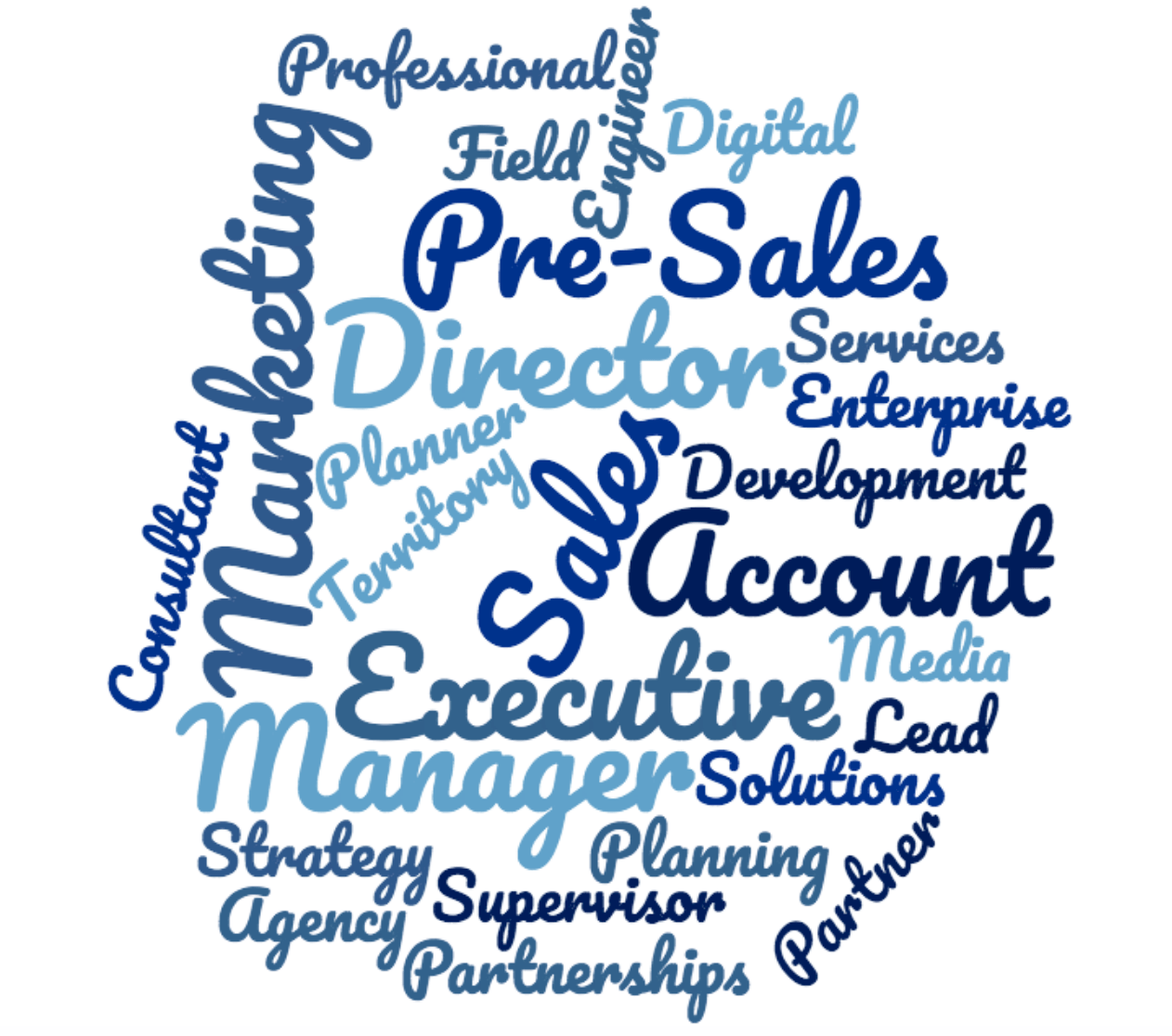
Here’s an example I created from 30 job titles I found searching for “Sales” in “New York”:
If you check out the word list, here are the top 5 by frequency:
16 Sales 5 Executive 4 Director 3 Account 3 Manager
Now I can go back to the job titles to get context around word order and come up with a headline that includes as many of those keywords as I can fit. In this case, I may go with: Sales Director / Account Executive.
This is just the starting point though. LinkedIn gives you a lot of space to work with in your headline and you want to use as much of it as you can.
Once you know what keywords you want to inject, you should use the rest of your headline to sell yourself. This will vary based on your goals, but here are a few ideas:LinkedIn Headline Character Limits
LinkedIn limits you to 120 characters for your professional headline on desktop. If you switch to the LinkedIn mobile app, the character limit increases to 200!
- Share a quick results-based case study (share accomplishments, metrics, big wins, awards, etc.)
- Share a link to your personal website or online portfolio right there in your headline (e.g. “learn more about how I do it here > CultivatedCulture.com)
- Include high priority skills and proficiencies
- Inject some personality and talk about something you enjoy doing outside of your specific job description
- Include a call to action for people read more (my profile has this). I use my headline to hook people in and tell them to learn more below with a little emoji pointing down
LinkedIn Headline Examples (From Real People)
Here are a few awesome examples of LinkedIn headlines to help you get some inspiration: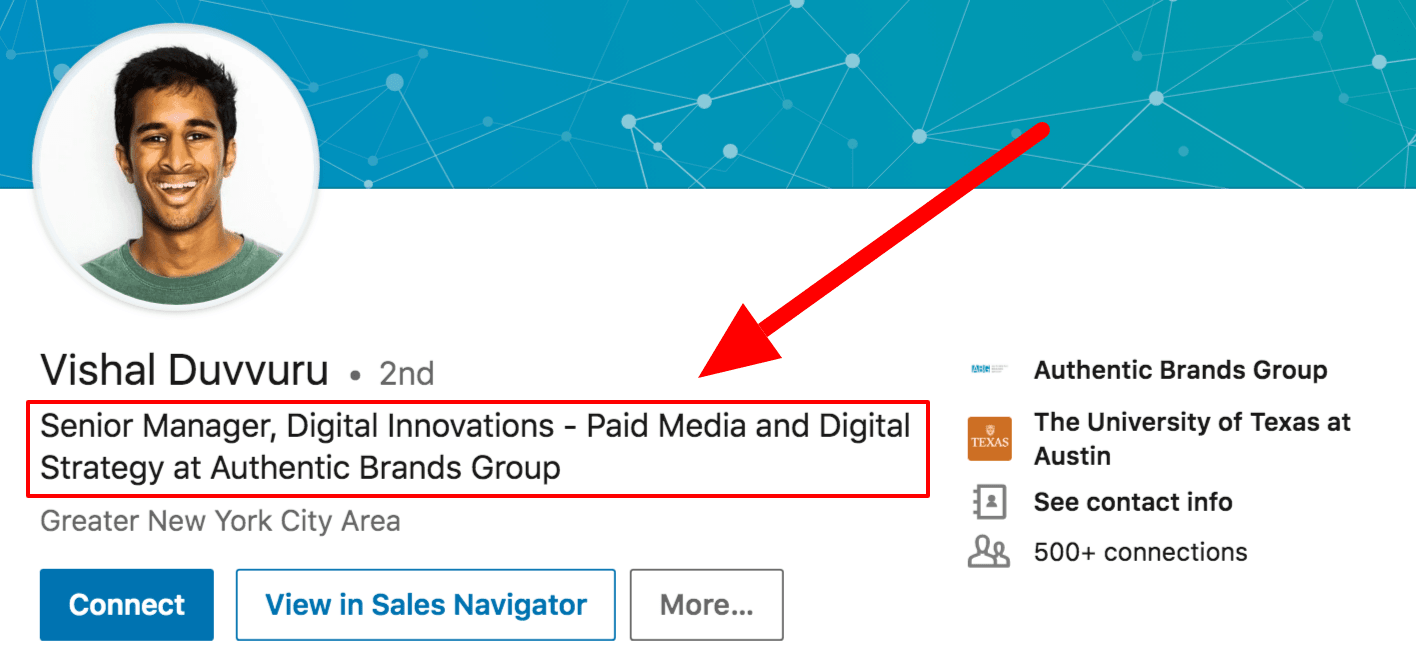
Vishal’s keyword-packed headline is going to get him noticed across a broad range of searches. He leads with his title (Senior Manager) and leverages the rest of his character limit to include relevant keywords like Digital Innovation, Paid Media, and Digital Strategy.
Vishal’s LinkedIn Headline: Senior Manager, Digital Innovations – Paid Media and Digital Strategy at Authentic Brands Group
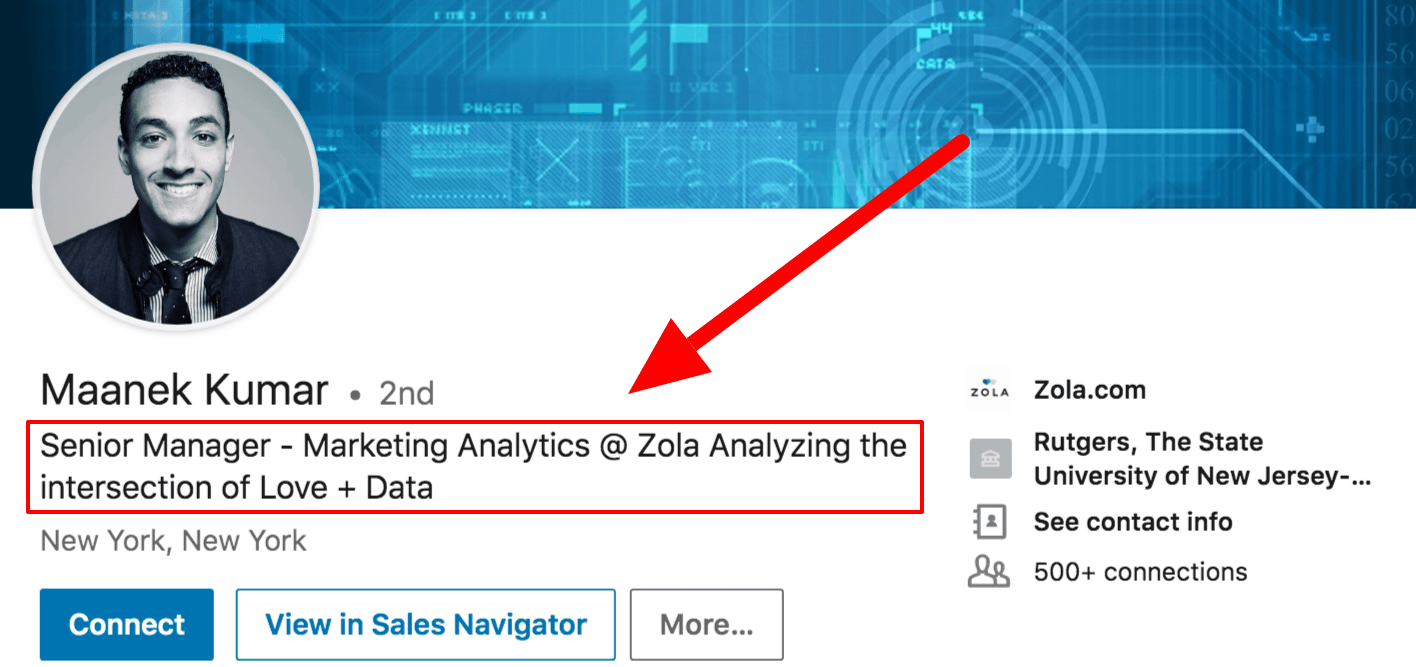
Maanek’s headline does a great job of leading with keywords. He’s got a searchable job title in “Senior Manager” and a highly popular field in “Marketing Analytics.” He uses the rest of his characters to add a little more color to his job and what he’s passionate about.
Maanek’s LinkedIn Headline: Senior Manager – Marketing Analytics @ Zola Analyzing the intersection of Love + Data.
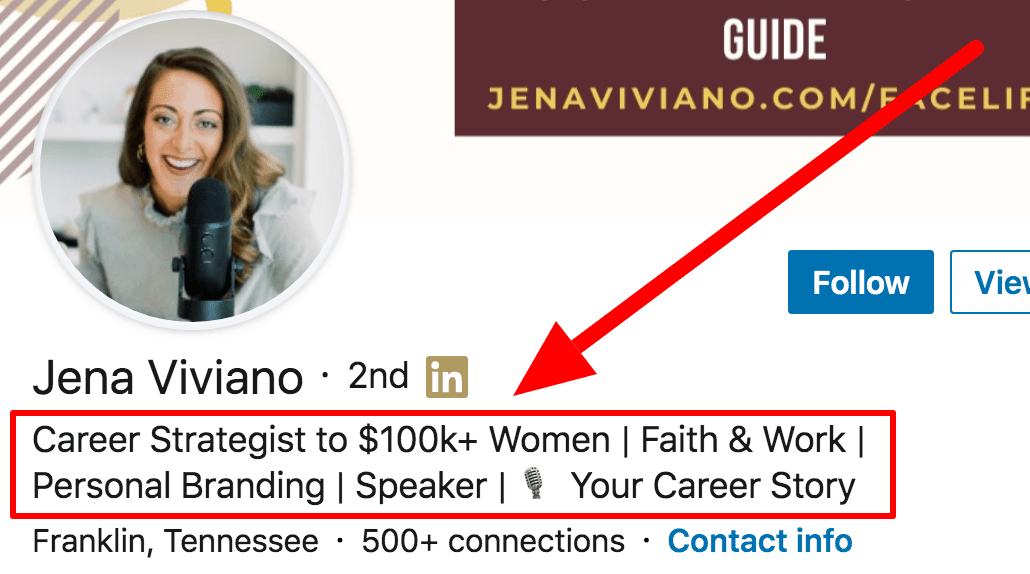
While she’s not a job seeker, Jena has a fantastic headline. She uses it to speak to her audience and tell them exactly what she can deliver.
She’s focused on women and she knows how to help them get six figure jobs (kudos to her for using the $100,000 figure instead of writing it out – it’s eye catching!). If you’re an entrepreneur or thought leader, you need to know your audience and your headline should speak directly to them. Address a pain point, share results, make it about them.
Jena’s LinkedIn Headline: Career Coach to $100k+ Women | Professional Development | Personal Branding | Faith & Work | 🎙️ #YourCareerStory
As a closing thought, I always notice that entrepreneurs and CEOs tend to have the best LinkedIn headlines. Why? Because they always need to be selling themselves (and the best ones can do it concisely).
But here’s the thing – you’re a CEO whether you know it or not. The CEO of your own career and your own life. You’re more than just an “Account Manager at Company” or “Human Resources at Company.”
You’ve contributed a lot to your company, your customers, your colleagues, your friends, your family, and your industry. Let that shine through in your LinkedIn headline!
Tip #7: Identify the keywords recruiters are using to find candidates
Remember my little restaurant analogy from the last tip?Headlines definitely carry a lot of weight when it comes to being found in search results, but LinkedIn isn’t stopping there. They scan every section of your profile and the more matches you have, the more frequently you’ll show up and get called.
LinkedIn is tricky because we can’t create multiple profiles for multiple roles like you can with a resume. You only get one profile and you want it to generate as many opportunities as possible. In order to do that, we need to get a sense of the keyword sets associated with the roles we want.
How to identify the right keywords for your LinkedIn profile
Identifying keywords for your entire profile is a little bit more complex than doing it for your headline.If you’re tight on budget and/or don’t mind doing a little bit of leg work yourself, you can definitely use the same Wordclouds trick I mentioned above.
That said, there are some paid tools out there that will help be significantly more efficient here. My two favorites are Jobscan and Skillsyncer (I have no affiliation with either and it’s worth noting that they are both paid tools with some free trial options).
Both of these platforms will digest any job description you upload and give you a detailed breakdown of what keywords you need to target. You can also copy and paste your LinkedIn profile sections to see how well you match up:
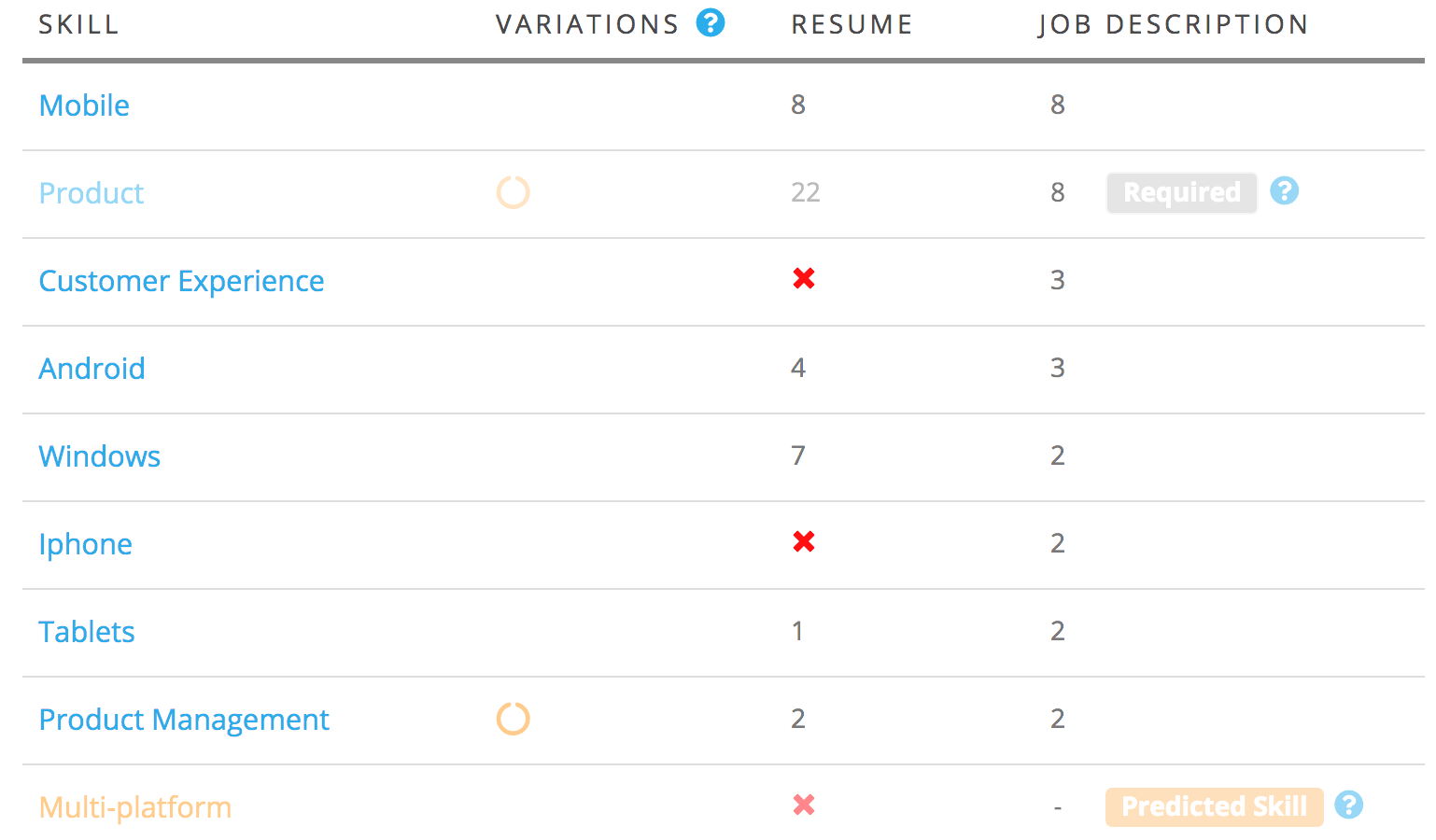
If you scan a few job descriptions for every type of role you’re targeting, these platforms will give you an idea of what keywords you need to prioritize.
Your job is to make sure they’re naturally woven into each of the LinkedIn profile sections we talk about in the rest of this post.
See all 15 tips and the complete article
Subscribe to:
Posts (Atom)