REVEALED: The simple keywords to use on your LinkedIn profile that will have employers coming to YOU with job offers
If you’re in a job search or plan to be soon, you know that the stakes are high in this competitive market. A major part of the process where many job seekers routinely underprepare is the interview. In fact, I often see candidates spend more time planning their outfit than their content.
While what you wear certainly has an impact, what you share earns an offer. And just when you thought the interview couldn’t get any more stressful, the current pandemic has changed up the game in new ways, so there are a few additional things you need to be ready for if you want to stand out and secure a great next step in your career.
Although you’ll no longer need to worry about the grip of your handshake (perhaps ever again), here are three new aspects that will be important to focus on in your next job interview:
1) You’ll need to set up the environment. While video teleconferencing has become more popular over the last several years, use of this medium for job interviews has dominated in the past few months due to social distancing, which means expectations for a near flawless execution have also skyrocketed. Fumbling through the process while experiencing distractions and technical difficulties isn’t an option, so it’s up to you to master the platforms being used and practice beforehand so you appear confident in troubleshooting any unexpected challenges.
And now, instead of showing up to a building where you meet in a conference room or office, you are required to set the stage for the interview environment, which takes some additional preparation and can have a major impact on the outcome. As the host of at least one side of the interview space, you’ll need to consider lighting, connectivity, audio quality, ambient noise, background visuals and video angles just to name a few.
Everything counts and will be a part of the evaluation since it’s likely you’ll be using video technology regularly to communicate in the new role, perhaps with customers, so the interview has become an audition of sorts.
Interviews are inherently anxiety-provoking and there’s a lot you won’t be able to control, so it’s in your best interest to control as much as you can regarding the environment. The ball for much of this is now in the job seeker’s court.
2) You’ll be asked how you’re handling the pandemic -- Read how to address this, #3 of the changes and more interview tips at the complete Forbes article
11 LinkedIn experts weigh in on how to start your LinkedIn job search campaign
Working for a One-Stop career center, I’m often confronted by
job seekers who haven’t used LinkedIn but know they must in order to
shorten their job search. Some of them believe they should begin by writing a compelling profile which makes good sense. But is a profile alone enough?
See what all 11 experts have to say and the complete Things Career Related article
** My bonus tips:
1) When you send a connection request tell them why you want to connect with them.
2) Don't ask " Can you look at my resume and tell me if you have a job that might be a fit" If someone isn't going to put in the effort to see if the company has a job posted that might be a fit how much effort will they put into doing the job... One caveat.. If it is a small company they might not post their jobs.
Put yourself in my clients’ shoes; you’re
starting with nothing. Of course you need to have a profile, and the
best you might accomplish is copying and pasting your resume to your
profile for the time being. First and foremost
1) Sarah Johnston advises to create a strong headline:
The first thing a job seeker should do is to consider their headline to make sure that it delivers the most value. LinkedIn only gives you 120 characters for the headline. Make sure that you are maximizing those characters to the fullest with search terms. No recruiter is searching for #ONO or people open to new opportunities UNLESS they need a temp or contract worker for an immediate fill role. Use words that a recruiter would actually search for to find someone like you.
So where do you go from there? Perhaps
just as important is inviting people to the party. In other words,
building a targeted network of the most important tier of connections
and expanding from there.
And equally important would be
communicating with your network. After all, if you don’t engage, your
out of sight out of mind. I know it sounds like a cliché but any
LinkedIn expert will agree that engagement is key to your campaign.
I wanted to know what great LinkedIn minds
think about how one should start and maintain their LinkedIn campaign.
Here’s what they wrote:
A strong profile is necessary to start:
2) Andy Foote says be deliberate when writing your profile. Do your research by looking at what others write.
Before you do anything with your own LinkedIn page, look around. Peruse a few career blogs, search on “LinkedIn” within them. Then spend half a day browsing LinkedIn, search on relevant hashtags like #linkedin and #linkedintips and #andydoeslinkedin (that last one is mine).
Look at as many profiles as you can and take notes, what do you think makes a “strong profile” and why? What elements do you need? What impresses you? What should you avoid doing? After you’ve thoroughly researched and made notes, roll your sleeves up and get to work on creating your new and refreshed LinkedIn presence.
Once you’ve finished, pick 5 people you trust and ask them for their honest opinion of your new profile page, take before and after screenshots if you really want to show them the transformation that has taken place. If they suggest changes, implement those if it makes sense to you to do so. Thank them for their feedback.
Understand that the LinkedIn profile is a living and breathing document, it needs to change as you change, so get into the habit of updating and tweaking it regularly. It is also a powerful networking device. Thousands of people will look at it over the course of your life!
See what all 11 experts have to say and the complete Things Career Related article
** My bonus tips:
1) When you send a connection request tell them why you want to connect with them.
2) Don't ask " Can you look at my resume and tell me if you have a job that might be a fit" If someone isn't going to put in the effort to see if the company has a job posted that might be a fit how much effort will they put into doing the job... One caveat.. If it is a small company they might not post their jobs.
8 Simple Steps To Get Your LinkedIn Profile Noticed
Bianca Miller Cole
The pandemic has disrupted everything but with most people working from home I think it might be the perfect opportunity to finally brush up on those LinkedIn profiles. I know, you have been planning to do it for ages but now is a great time to finally sit down and look over your LinkedIn profile and question whether is it good enough. Does it represent your personal brand, does it illustrate the value you bring to your organisation, does it showcase your skillset. Ultimately you want to ensure that your online profile is attractive to potential employers or clients whilst telling a story about yourself and what you can offer. You never know, you might get that dream job or client you have always had your eye on!
Now, I am a massive fan of LinkedIn, so much so that in 2015 I was awarded a Top 10 “Power Profile” out of 20 million members in the U.K. alongside Richard Branson (Yes, I know, I am chuffed too!) so I may be a little biased. But I do believe that LinkedIn is an excellent professional networking site, it ranks beautifully for SEO and it is a great way to connect with others globally.
So why not take advantage of what is available to you at your finger tips?
Believe me, I could talk about profile optimization all day and often I do when I deliver training for my clients, so here are a 8 simple tips to get your LinkedIn profile noticed:
3. Don’t make your headline boring
One of the most visible parts of your LinkedIn profile is the headline. This is the first piece of information employers see about you, so you want it to be interesting but also reflect directly who you are as a person.
There are ways for you to be creative including:
- Include brands, any famous companies you work for or are well known you want to make sure they are added in at the beginning.
- Adding in the titles of who you are at your current place of work. So, if you are a founder or investor you want to make sure you add these words as they showcase your leadership roles.
- You also want to highlight your expertise, if you are an expert in a niche area of your job then make sure to highlight it. Another great way to have your profile noticed is for you to include in your headline that you are actively seeking opportunities for a role. An example could be “seeking for a UX/UI internship role.”
To capture that information you could try a series of keywords or a sentence to illustrate who you are. Here is an example of mine:
"Personal Brand Expert |Speaker |Author |Entrepreneur |Forbes 30Under30 |LinkedIn 'Power Profile'| TV Business Mentor"
Important note: A simple job title isn't often sufficient as it doesn't explain your value or experience and the title may mean different things to different industries.
6. Be socially active!
Make sure you are active and interact with others on your LinkedIn profiles! You can do this by liking, commenting and sharing other people’s content that appear on your LinkedIn feed. You might also want to consider producing and publishing your own content, on a topic you may be passionate about. You could write an article, create a video or produce a series of images explaining an idea and sharing it with others in your network. This will show potential employers or clients your passion and will also get you more noticed through searches and shares of your work.
8. Get those recommendations!
Employers (and clients alike) will notice if you have recommendations under each position you have had. This will show you are a valuable asset and will provide evidence that others had a great opinion about you too. You want to ask those that provide recommendations to ensure they are short and informative, saying what you contributed to the workplace, project and the role/s you had.
These are just a few tips to get you started in getting your LinkedIn profile noticed. Enjoy the experience of creatively putting your profile together as it is a chance to really show who you are and what you can offer to the next job you work at or client your support. Although job opportunities may not be flooding in at this uncertain period of time, it is a fantastic opportunity to tailor profile and build relationships so that when normality resumes you have a kick start!
20 steps to a better LinkedIn profile
The LinkedIn profile page is the foundation for your personal branding. And we regularly add features to increase its capabilities as a personal marketing platform and give you new ways to signal your skills and motivations. If you haven’t checked your profile page recently, you might well find new ways to build your personal brand.
Here are 20 profile features you should check and update for 2020. Some of them are very quick wins, some of them may take a little bit of time – but all of them are very worthwhile. They will help to give you the LinkedIn profile and personal brand that you deserve.
3. Make your headline more than just a job title
There’s no rule that says the description at the top of your profile page has to be just a job title. Use the headline field to say a bit more about how you see your role, why you do what you do, and what makes you tick. If you’ve got sales reps at your company who are on the ball with social selling, then take a quick look at their profile page headlines for inspiration. They will almost certainly have more than their job titles in there.
4. Turn your summary into your story
The first thing to say about your LinkedIn summary is – make sure you have one! It’s amazing how many people still leave this field blank when creating their LinkedIn profile. Your summary is your chance to tell your own story – so don’t just use it to list your skills or the job titles you’ve had. Try to bring to life why those skills matter – and the difference they can make to the people you work with. Don’t be afraid to invest some time, try a few drafts, and run your summary past people you know. This is your most personal piece of content marketing – and it’s worth the effort.
16. Share relevant content from your LinkedIn feed
It’s one thing to have a network of connections on LinkedIn – it’s far better to have an active role in that network, appearing in your connections’ LinkedIn feeds in a way that adds value for them. Sharing relevant content with your network is one of the most accessible ways of doing this. You can make a start by keeping a close eye on your LinkedIn feed, and sharing content that you find genuinely interesting – and that aligns with your point of view.
17. Add comments
Sharing is great – but it’s just the starting point. When you add comments to your shares, you give yourself greater prominence within the feed and start to express why you think a particular piece of content matters. Well-expressed comments also enable you to share a broader range of content. It might be that you don’t agree with a point of view but still find it interesting, for example. A comment that can express that viewpoint starts to establish your opinion and thought-leadership. It’s also more likely to draw additional comments, which then raise your profile across LinkedIn. Bear this mind when you’re writing your comment – and make sure you’re saying something you’re happy for people to associate with you.
Six ways to make your LinkedIn company page stand out
Dayna Steele
As business gears back up, search activity is doing the same on LinkedIn as companies look at personal profiles and company pages for hiring, contract work, leads, and more. Don’t wait – this would be a great time to get to work updating and refining your online information.
Viveka von Rosen, Chief Visibility Officer & Co-founder at Vengreso and LinkedIn author, has six great tips on what companies should be doing right now to update your company presence on LinkedIn.
ONE: Create a new banner
Create a banner that speaks to your audience’s points of pain or needs right now! Especially if they have been adversely affected by Covid-19. Use your banner to let them know you can help solve any issues your clients have due to furloughs, decreased budgets, remote working, Illness, fear, etc. You can get the dimensions at www.VengresoBanner.com. Check out what it might look like at www.LinkedIn.com/company/Vengreso.
TWO: Create relevant content
Create relevant content on your LinkedIn company page every day. Stop the heavy-duty sales pitches and job postings. Find content that is useful to your audience, either your own or curate relevant content from partners or clients. Use the description or “what do you want to talk about” section to describe the asset you are sharing, why they should read it, and what they’ll get out of it. And, if you are sharing a partner or client’s post, make sure to @Mention the person or company in the post.
THREE: Employee advocacy
If you have employees, share the link to the post with them (in an email, or through your employee advocacy tools or a project management tool like Asana, Slack or Teams). Then they can share it with their networks, which will significantly increase the views on your posts and may get you new followers as well. You will have to be an ADMIN to post the content, but employees don’t need to be an admin to share it.
** I'm a big fan of number 3 **
See all six ways and the complete Microsoft.com article
LinkedIn’s AI gives job candidates feedback on their interview answers
KYLE WIGGERS@KYLE_L_WIGGERS
LinkedIn announced a new AI-powered feedback tool for people practicing answers to job interview questions. The Microsoft-owned company claims that in early tests, it resulted in a “significant increase” in LinkedIn members rehearsing their answers.
The tool taps into technology Microsoft developed for Presenter Coach, a PowerPoint feature designed to provide guidance with respect to pacing, tone, and attention, and it could be of use to the more than 50% of people who say they lack confidence during interviews. Candidates have reason to be nervous — content agency Come Recommended reports that 33% of interviewers claim they know if they’ll hire someone within the first 90 seconds.
With the new AI practice feature, once LinkedIn members record and upload their answers, they get a detailed assessment of their answer delivery within seconds. This includes a report with metrics like filler words used and their frequency, words per minute, and speed over time, as well as feedback on cadence, profanity, and phrases that might be considered culturally insensitive.
For instance, the LinkedIn tool detects the pace of speech and recommends changes that might help interviewees better understand facts and figures. If a user inserts a disfluency like “um,” “ah,” “like,” “actually,” or “basically” or makes a potentially gender-charged reference like “you guys” or “the best man for the job,” it will recommend alternatives.
“This [new tool] provides an interactive way to practice answers to the most common interview questions in private,” wrote LinkedIn senior director of product Blake Barnes in a blog post. “Interview prep also gives you the ability to request personal feedback on your practice responses from your connections.”
LinkedIn also launched a feature in preview called video introductions, which allows employers to request that candidates submit recordings or written snippets as a part of the hiring process. The aim is to enable hiring managers to assess a would-be employee’s communication skills prior to the first live interview; LinkedIn says that 92% of talent professionals consider soft skills (e.g., people and social skills) equally or more important for hire than hard skills (teachable and measurable abilities).
Read the rest of the VentureBeat article for more information and examples.Update Your LinkedIn Profile with These 8 Creative LinkedIn Profile Tips
by Neal Schaffer
Isn’t it time that you update your LinkedIn Profile?
Considering that LinkedIn profiles are the most viewed pages on LinkedIn, and your profile page really is every professional’s starting place to claim and create their own professional brand, you should be regularly reviewing your LinkedIn profile to see how you can optimize it with every user interface change. With that in mind, here are the key areas in which you should focus your optimization efforts on:

If you haven’t added any new LinkedIn connections for awhile, see my
video below for how many LinkedIn connections I recommend you should
have!
See all 8 tips and the complete NealShaffer post
Isn’t it time that you update your LinkedIn Profile?
Considering that LinkedIn profiles are the most viewed pages on LinkedIn, and your profile page really is every professional’s starting place to claim and create their own professional brand, you should be regularly reviewing your LinkedIn profile to see how you can optimize it with every user interface change. With that in mind, here are the key areas in which you should focus your optimization efforts on:
2.) Make Your Profile More Discoverable
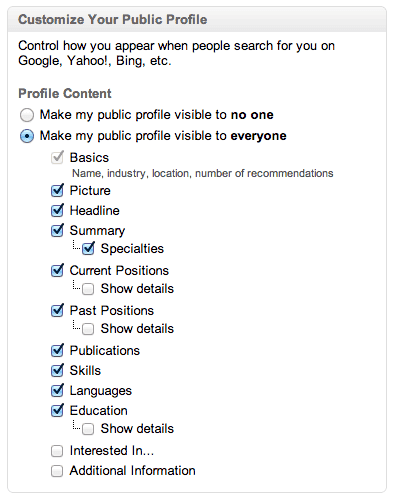
Unless you try to edit your profile you won’t see it, but LinkedIn has created more granular ways for you to decide which specific profile content you want to make more visible. Assuming that you are on LinkedIn to be found, it makes sense that you would want your entire profile visible to the public search engines. However, even though my profile has always been set to be as publicly on display as possible, I noticed that the new LinkedIn settings meant that certain sections were NOT being exposed to search engines. Below is the screenshot of what my settings looked like when I first saw them. You’ll want to make sure that you check off every box like I ended up doing. 3.) Get Active!
In the world of online marketing, what appears “above the fold” on your website is critical in that this is the content a viewer will see without having to scroll down. What features prominently in the new profile is your “Activity,” or status updates as well as other actions that you perform on LinkedIn, which wipes out all but the title of your professional summary. This makes your most recent LinkedIn status update all the more crucial as it will be featured rather prominently above the fold and visible to all who view your profile. LinkedIn’s decision to prevent you from automating publishing every tweet as a status update was a welcome move to make your network updates more professional, but you still need to ask yourself before posting any status update if they are truly 1) professional and 2) aligned with your branding. You also want to make sure you post at a certain frequency, say a minimum of once a week, so that your latest update doesn’t seem stale and out of date. You can easily use LinkedIn Today to curate relevant content to share with your network, so now’s the time to make that feature part of your LinkedIn routine.8.) Increasing your Connectivity and Commonalities
My final LinkedIn profile tip is a general one about increasing both your connectivity as well as commonalities on LinkedIn. Why? Because you want to create as many data points as possible to allow relevant people you are trying to easily reach out and start a conversation with you. All of this information is being displayed in the righthand side of anyone who visits your profile, so maximize this functionality by increasing your connectivity and commonalities as follows:Connections:
Every additional connection you make gives you the ability to find, and be found, by many more people. Although this doesn’t appear on all profiles yet, the below image gives you a feel for how prominently your connectivity status with a 2nd degree connection will be shown:
Increase your LinkedIn connections to increase your connectivity to any given user.
[youtube=http://www.youtube.com/watch?v=xXegeRJkvu0&w=480&h=360]
Groups:
Being a member of the maximum 50 groups will increase your connectivity AND commonality with any given profile by not only showing the common groups that you are both a member of, but also by allowing that 2nd degree or beyond connection the ability to easily message you by going to that common group.Skills:
Imagine if you’re trying to attract CMOs to your profile, yet your Skills and theirs don’t overlap. Wouldn’t that be strange? Showcasing commonality in skills with those who you are trying to attract to your profile should be another priority in helping you increase your thread of commonalities. Of course, if you’re trying to attract an audience that has nothing in common with you it is one thing, but just by looking at the skills that a representative sampling of the audience you want to attract have and aligning a few of your skills where appropriate could make a positive impression by showing off your commonality in this area. As LinkedIn continues to roll out the new user interface to its user base (I only got mine this week), I am sure that we will see more changes as they continue to implement their vision for their platform. However, the above profile tips are the things that you can do immediately to truly maximize the potential for the new personal profile page user interface. Any other profile tips that you would add? Please chime in!See all 8 tips and the complete NealShaffer post
Stop Ignoring Your LinkedIn Profile. Best Ways To Update It Now
Robin Ryan
Today I worked with Susan, 59, an IT Manager working in the healthcare field. She has been working in her company for over 20 years. She has ignored LinkedIn as she likes her job, that is, until awhile ago. Her manager changed, and a promised promotion went to someone else. Her husband encouraged her to job hunt, and she contacted me to help her write her LinkedIn Profile.
Susan didn’t have a profile. No connections, no professional experiences, no skills, — she had nothing. As a career counselor who writes 4 or 5 LinkedIn profiles a week, I haven’t had anyone recently who had no LinkedIn presence at all. Then, today I worked with Dominick, 60, and he just lost his job. He has decided to go ahead and formally launch his consulting business and wanted help creating his LinkedIn profile. He also didn’t have anything written on his LinkedIn Profile page, confessing he didn’t think he needed it before.
Last week, I had two people who had Profiles with nothing really on them besides their current job title and a photo. I thought, “Could this be a baby boomer trend from the coronavirus? Are people who have no profiles deciding to join the world’s largest professional network?” You have to wonder. We hear so much about the importance of a well written and up-to-date LinkedIn profile; I question how people are missing that career message. I can’t stress enough that you need a well-composed LinkedIn Profile. Ask any career counselor, and they will agree with that statement.
Whether it’s because you lost your job, or are taking a new career path, or want a better position, your LinkedIn Profile is crucial to your job search. There are still some companies hiring. There are still recruiters searching for candidates on LinkedIn every day. You don’t want to be embarrassed when a recruiter, hiring manager, or a colleague comes to look at your profile. You want to be proud of who you are and what you have accomplished. Since 90% of America is stuck at home, now is the right time to make an effort to update your LinkedIn Profile.
Making More Connections
You won’t automatically start getting all kinds of action if you don’t have any connections. LinkedIn says that having connections with people you know is vital. It is also how the algorithm works. You want to try to connect with 300 or more people. You need that many to make LinkedIn effective in noticing you. Who makes good connections? Current and past bosses, coworkers, professional colleagues, association and club officers, friends, college classmates, and business owners. Start making requests. Just note that you are limited and can only send 30 individual invitations per day.
Here is a much faster way to get connections. LinkedIn has made it easier to add your email contacts to build your social network.... Read the full Forbes article to find out how and more tips and tricks.
Here's How You Optimize Your LinkedIn Profile to Strengthen Your Personal Brand
Here's a question I get asked a lot: Do you do SEO on clients' LinkedIn profiles? The answer: Yes.
There
are steps I take to increase the chances that profiles I work on turn
up in Internet searches and LinkedIn searches, too. And you can use
these strategies to optimize your own professional profile.
1. Sprinkle keywords throughout your profile.
Think
about the terms people would use to search for someone with your
expertise. These are your keywords, and you should sprinkle them
throughout your profile, starting with your headline.
With
your headline think of the words that prospective clients and
recruiters would use to find someone like you. Think job function,
specialty and career tenure. For example, Marketing Director and Senior
Communications Strategist conveys long established marketing and
communications expertise. Marketing Director and Senior Financial
Communications strategist adds another layer, specific industry
experience.
Make sure current and past titles and job descriptions -- those in the Experience section -- are likewise optimized.
In
the About section, which is the bio section, I recommend using keywords
but only to the degree that they don't interfere with telling a story.
This section is less about stringing together industry words and more
about telling a story that makes you stand out. Think of it as your
"why" -- why you do what you do and how you got here -- versus a listing
of accomplishments, which is what the Experience section is for.
3. Use hashtags in your posts.
When
you post to LinkedIn, use hashtags that correspond to your keywords.
For example, when I share stories that I've read or written about
LinkedIn or public relations, I include hashtags like #linkedin
#linkedmakeover #publicrelations #PR.
I
recently asked a LinkedIn makeover client who lives in New York how she
found me. It was simple. She was searching on LinkedIn. This happens a
lot. It works.
See all the steps and the complete Inc. article
See all the steps and the complete Inc. article
Subscribe to:
Posts (Atom)