10 LinkedIn Headline Examples of Recruiters

Most of us have realised the importance of the LinkedIn headline by now. It is your 120 character hook to people finding you in a LinkedIn search, it should be about what you do as opposed to what you are. It should be memorable and enticing enough for someone to click on your profile and not your competitors.

I have compiled a little list of a few recruiter’s headlines on LinkedIn, partly because we do a lot of work with recruiters (see our LinkedIn Training for Recruiters) and partly because recruiters are all over LinkedIn like a cheap suit.

1. The Informative Headline

Greg Savage does a number of things and has therefore opted for describing himself and his business Firebrand, it’s functional and informative.


2. The Keyword stuffer

Search for SAP recruiter, SAP headhunter or just SAP on LinkedIn and you will get Daniel Patel at the top of the search results – evidence that keyword stuffing works. He even has sap in his customised URL :-)


3. The Overachiever

Stacy Donovan Zapar is a very well connected woman and she wants us to know it. I don’t know about you but I did remember her profile from the first time I saw it.


4. The Numbers Man

Glen Cathey is an analytics man and his subtle numbers indicate he knows what he’s doing – just like anyone reading his blog Boolean Blackbelt can attest to.


5.  The Basics and the Great Pic

Melanie Benwell has opted for a very simple description here but her picture is very good and surely gets her more clicks than your average recruiter?!


Profiles 6-10 and the complete LinkHumans article

LinkedIn: When To Say No To Connecting

Debra Donston-Miller

Should you accept LinkedIn connection requests from strangers? Before deciding, make sure you understand the security and reputation risks.

Facebook, Twitter, Pinterest and the like make sense professionally for some people, but not for others. Presence on LinkedIn, on the other hand, is a no-brainer.
Although LinkedIn has gone through lots of changes lately, for the most part it is what it is: the leading social network and collaboration space for people who want to make and develop professional contacts and their own careers. What's less clear about LinkedIn is how far your network should extend. Sure, having lots of connections looks good on your profile, but is any connection a good connection? Can some connections actually hurt you?
There are two schools of thought on this issue, according to Ari Lightman, professor at Carnegie Mellon University and director of its CIO Institute. "If you're an open networker, it makes sense to connect to as many folks as possible -- that broadens your network and gives you reach which might come in handy and provide greater visibility," he said. "The other camp says if you do not know the person you should not connect with them."
Lightman said the arguments for being more selective about the people you connect with are focused on relevance and security. "More people make it more difficult to receive information that really might be of value," he said. "Another argument for no is that you open up yourself to spam from folks who want to sell you products and services. This is commonplace, and many people simply tune it out. But when there is malicious intent -- say, a phishing attempt -- then clicking on a link can load a virus onto your system. There have also been several fake connection requests infecting the unsuspecting user with virus attacks."
And as LinkedIn and other social networks soak up more and more of our personal information, people may be looking to connect to perpetrate identity theft.
"There is plenty of information that someone could mine if they wanted to try and recreate your identity, including work history," said Lightman. "Exposing your information to a wide community gives them access to lots of data about you that could be used maliciously. LinkedIn, as well as all other social networks, are trying to get this under control by allowing people to adjust their privacy settings. It comes down to the classic trade-off of openness/transparency versus risk mitigation."
In addition, indiscriminate connecting isn't just a threat to you; it could be a threat to your company and your colleagues, according to security consultant Brad Causey.

LinkedIn profiles for the out of work - A guide to keeping profiles honest without sounding desperate

By Jonnelle Marte

There are no good euphemisms for unemployment. Job seekers often suggest they are “in transition” or “looking for the next great opportunity,” but experts say such phrases don’t really sugarcoat things.


This dilemma has become even more important since the advent of LinkedIn, which has turned resumes into public, living documents. Career coaches are divided on how much job seekers should describe their joblessness. Some argue people should instead showcase what they’ve accomplished and what their goals are. And when the euphemisms are included, many suggest they should be part of a longer sentence about one’s experience. When people broadcast their joblessness “it just sounds desperate,” says Pete Leibman, author of “I Got My Dream Job and So Can You.” “I think they’ll be better off if they say something about what they’ve achieved in the past and how they can help employers going forward.“                                          

The headline field on a LinkedIn profile, which career pros say should be a kind of mission statement as well as a job title, can be an especially challenging slot to fill in when a person has no current employer. Leibman recommends writing a line that says what you’ve worked on and who you’ve helped. For instance, even a recruiter in between jobs can use the space to say they’re “an executive recruiter who helps IT companies find top talent,” which would give insight on what they do and what kind of clients they serve. It might also help to list some previous clients or projects you’ve worked on to give recruiters an idea of the scale of the work you’ve accomplished, he says. “You need to stand out from the pack,” says Donna Serdula, author of “LinkedIn Makeover,” a book that offers tips on how people can optimize their profiles.

hose overwhelmed by the idea of crafting their profiles in a way that maximizes their chances of catching a recruiters’ attention can turn to professional help from people like Serdula, who will create a person’s profile for a fee ranging from $300 to $1,000. (The more expensive package includes LinkedIn group connections and mentoring support, among other services.)

Unemployed job seekers can use the “summary” field, often left blank by light LinkedIn users, to say more about their top career accomplishments, says J.T. O’Donnell, chief executive of Careerealism.com, a career-advice and job-search site. Job hunters should avoid vague platitudes about themselves that don’t offer specific examples about their experience or how their project impacted their last employer, says O’Donnell. And they should sprinkle in keywords that appear frequently in the job descriptions they’re interested in, a move that could improve their chances of showing up on recruiters’ searches, says O’Donnell.

Another warning: never, ever, talk about yourself in the third person. A summary starting with “Bill is an aggressive self-motivated worker,” might make a recruiter cringe, says O’Donnell . Instead, use the space to highlight major skill sets and career accomplishments. If you ramped up a company’s sales, or headed a revenue-generating campaign, say so and provide figures, she says. And be concise, making sure your entire summary takes up no more than two-thirds of a computer screen, she says.

More advice and the complete MarketWatch article                                          

7 Must-Haves to Grow an Audience Via LinkedIn Groups

By 

In our digital paced culture, there are countless ways to grow an audience. But which ones really work? I recently had great success leveraging LinkedIn Groups to boost my subscribers and blog readers (you may be one of ‘em!). Here is how I did it and how you can leverage LinkedIn Groups as your next generation catalyst.

LinkedIn Groups provide a place for professionals in the same industry or with similar interests to share content, find answers, post and view jobs, make business contacts, and establish themselves as industry experts. I leverage LinkedIn Groups to connect with like minded individuals who can collaborate over new ideas. I have joined 46 different groups, started my own group and actively contribute to most groups. I post to my blog twice a week and if any of my content is applicable to a particular group, I will post a link to the blog post along with a thought-provoking discussion question.

I usually get a few likes or comments per discussion post. However, I posted my article “What Everybody Ought To Know About…The Myth Of Experience“ into the “Future Trends” LinkedIn Group on Sunday April 28th and (to date) it’s generated 32 likes and 101+ comments. The next closest article in the group has only 39 comments.
I do not share these stats to impress you but rather impress upon you how valuable LinkedIn Groups can be for your brand or business.

7 Must-Haves To Grow An Audience Via LinkedIn Groups:
  1. Value-Add Content. The content that you share must bring value to your intended audience. If the content falls flat, you’re sunk. Nothing else will matter.
  2. Catchy Title. Ensure the title of your discussion is succinct and attention grabbing. My title was: “Is experience irrelevant these days?” And if you choose to add additional details, use it to create more interest. I used: “Before you answer that…consider these trends.”
  3. Relevant Content. The content shared must relate to the theme of the group. For example: Don’t post “How To Perfect Your Golf Swing” in the Future Trends group.
  4. Concise Content. You will capture more readers if your content is scannable, scrollable, and skim-able. Stay clear of long and heavy content. Shoot for less than 500 words.

Tips 5-7 and the complete B2C article

5 Tips For Using The New LinkedIn Contacts Feature

by  

LinkedIn is in the process of rolling out LinkedIn Contacts. In addition to several new features that are giving it a new look and feel – if offers enhanced functionality for better managing your relationships and social engagement.
There is no question that all of the major social networks want you to use their service as your social dashboard. However, many social networkers prefer to use an independent tool such as Hootsuite to effectively manage their social networks and build relationships.
One of the challenges is there is a disconnect between public social networking and private means of communication that often lead to sales conversion – namely email. This is where services such as Nimble are leading the way, by bringing social and email into one dashboard, and one reason why I especially like LinkedIn Contacts.
What gets even more interesting is that concurrent with LinkedIn’s rollout of LinkedIn Contacts, Nimble has launched Nimble 3.0, and there are some interesting contrasts and similarities. (More on Nimble in a future article).
For now, here’s how to get the most out of LinkedIn Contacts.

#1 – IMPORT YOUR CONTACTS

You have always been able to import your contacts from other sources into LinkedIn. However, now with LinkedIn Contacts there are multiple options for doing this – while also tracking where the source of those contacts. To get started, just go to contacts in your LinkedIn profile, and then settings.
2013-05-23 Linkedin Contacts

Some of the possible sources for importing contacts into LinkedIn
What is especially useful is the refresh button. So, let’s say you imported your friends from Facebook a month ago, just hit the refresh button to bring in the new ones.
Incidentally, while Facebook does not let you export the email addresses of your friends, there is a workaround using Yahoo Contacts to import your Facebook contacts into LinkedIn. Since Facebook is not prone to sharing, I suggest doing this now to avoid the risk that this capability will be blocked in the future.
Know that you won’t get all of them, because not everyone has an email address publicly linked to their Facebook profile.

#2 – SET REMINDERS TO CONNECT

It’s easy to make that first connection, but anybody that has ever attended a live networking event knows that often nothing happens after that. In the old days, business cards got pushed into a drawer. Today, connections are made and forgotten days later.
So, a great solution is to use LinkedIn Contacts to set a reminder to follow-up with your connections a few weeks or so later. At the very least, your new connection will be impressed with your organization, and if you can also share some useful information, better yet.
 LinkedIn reminders, tags, notes, and conversation history

LinkedIn reminders, tags, notes, and conversation history

#3 – MERGE DUPLICATE CONTACTS

Many people unknowingly or not set up multiple profiles on LinkedIn. As a result, you may find yourself connecting with their abandoned profile because they did not delete it.
Now LinkedIn pulls up what they believe to be all duplicate profiles so that you can merge them. You simply unclick those on the list where the same name is actually two different people. Then just click merge and just like that – you have cleaned up your database

The 5 Most Powerful Things you Can Do on LinkedIn You Never Knew

How To Pick LinkedIn Skills That Get The Attention Of Employers

By

Most people let their network determine what Skills appear on their LinkedIn profile. Sure, you might pick the first 10 or so before getting bored. Then, pretty soon, you start getting endorsed for things you’ve never even heard of.

The trouble is that many of these skills aren’t searched very much by employers or they are way too crowded for you to get noticed for.

Yes, employers use skills to search. They either use them as keywords, or through the LinkedIn Recruiter product where Skills are a search parameter. Therefore, in order to improve your chances of 1.) getting found by employers, and 2.) getting endorsed for the most relevant Skills, use the following strategy to pick your LinkedIn Skills.

Not All LinkedIn Skills Are Created Equal

Head on over to http://linkedin.com/skills and look for Project Management. You’ll see that this is the 8th most popular skill used by all LinkedIn users.

So if you are a project manager, it certainly makes sense to use this skill. However, you’ll notice the top 10 people in your network with this skill. Click on the #1 project manager listed there. (On my list, the #1 project manager has 321 endorsements for the skill).

If you have more experience than them at a higher rank in a company, then you don’t need this article. If that person out-ranks you, then keep reading.

Step 1.) Start With A General Skill

First, you want to start high level. Pick a Skill that is all encompassing for what you do. Using the Skills’ pages’ auto-suggest, begin typing the name of your Skill. LinkedIn will suggest the most commonly used version of that name.

Open up that skills page and add it to your profile if its not already there.

Step 2.) Triangulate Down To More Specific Skills

Once you’re on the high-level skills page, there are a number of important research tools available to you.

On the top right of the page, look for the graph called Relative Growth:
Relative Growth
This chart tells you which skills are growing, year over year, relative to other, related skills.

Pick a skill with a positive growth rate.

You may find many skills with a negative growth rate, avoid these.
Next, tab over to the Size chart. You’ll see that your high-level skill will eclipse it’s closest competitor, much like this:
Size Chart
Click on the next one down to get a better view:
Size Chart 2
Begin picking Skills that are related but have a smaller size and a positive growth curve. For example, I found that Creative Resourcing is a skill with relatively fewer competitors (only 460 people use it) but with a very high growth curve (23% year over year growth).

Bingo.

More tips and the complete Careerealism article

How to Find a Job With LinkedIn’s New Search

by Joshua Waldman

That’s a ton.

Since it’s such a popular feature, LinkedIn users demanded a better search experience. Luckily, LinkedIn’s software development team listened and launched an enhanced version of their search technology.

(It happened on March 25. Did you notice?)

The good news is this new search makes it easier for recruiters to find you but ONLY if you’ve written your profile correctly.

Here are three ways to leverage LinkedIn’s new search approach. Follow these steps and you’ll improve your profile, and as a result your job search.

1. Saved Search

Guess what? LinkedIn’s new search adapts to your style and your network. The more you search, the better your experience will be.


As your network grows, your search results will change. So be sure to save searches you make frequently to save you time and so LinkedIn will adjust to your needs.

Want to save your search? It’s easy. Run a search, and then on the results page, click the green plus (+) sign on the top right.

I recommend saving searches on keywords you are trying to rank for so you can determine if you’re making progress.

Also, you can save searches for job titles you are going for at certain companies to see if anyone new is there to network with.

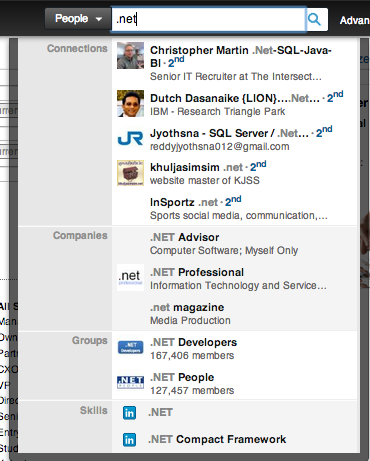
2. Autocomplete for Keyword Research

Knowing what words to use in your profile can be a guessing game. Sometimes “Bursar” is better than “accountant,” sometimes “advocate” is better than “organizer.”

LinkedIn’s new search feature provides an autocomplete and autosuggest which you can use to see what words are popular trends.

Review the example below (image). I searched for .NET to see what skills I should include in a client’s profile. I’ll admit, I would have never thought of .NET Compact Network.

Give it a try. Start by typing your current job title or skills to see what LinkedIn suggests for you.

This Simple Action Will Dramatically Grow Your LinkedIn Network


If you’re on LinkedIn, you want to grow your network. You want to connect with as many people as you can, because there’s some serious career-boosting power in those connections.

But there’s something you’re probably not doing, at least not on a regular basis — and it’s a move that will give you a far better bang for your networking buck.

Write a Personal Message

Most people don’t do this. Think about how many requests land in your inbox without a note — the majority of them, right?

And what about you? Do you add a personal note every single time you request to connect with someone on the network? Or do you hope that potential connection will recognize your name or connect on faith alone?

Since so few people write a personal note, that means opportunity for you. Because when you do something differently, it helps you stand out.

But this tip is about more than being unique. It’s about making it as easy as possible for the person you’d like to connect with to say yes.

Make Yourself Memorable

A lot of the people you want to connect with have huge networks. That means they often meet new people, either online or in person, and they get a lot of LinkedIn requests. And inevitably, they won’t recognize many of the names of the people who want to connect.

Yes, even if you had what felt like a life-changing conversation with that person a week ago, she might not remember your name.

Or perhaps you never met the person at all, and simply read his blog, follow him on Twitter or are a big fan of his work. If that person has never heard of you, what’s the incentive to press “accept?”

While some LinkedIn users do accept any requests that come their way, most people prefer to establish quality connections. They want to know who they're saying yes to.

That's where the personalized note comes in. No matter how sure you are that the people you’re hoping to connect with should remember you, write a brief message reminding them how you know each other — or why you’d like to know them — and they'll be far more likely to accept.

And yes, this works even if you’ve never met or interacted with that person. If you go the extra mile to let him know how you found him, why you love his work or simply make yourself look interesting, the person on the other end of that request will want to say yes.

Be Succinct, but Personal

So what should you write in your invite?

It doesn’t have to be anything fancy. In fact, it can’t be fancy because LinkedIn only gives you a few characters to get your point across. It just has to be more appealing than LinkedIn’s default “I’d like to add you to my professional network.”


Here are a few examples that could work.  See the examples and read the complete Mashable article